

75 changes
Hand work to your own AI, a free plan, and website forms that become leads
AI now runs on your workspace's own key: hand it work from a board or a chat message and follow every run in one place. Anyone can sign up and start free, projects get shareable join links, website forms land in CRM as leads, and Chat reaches everyone you work with.
- 36 new
- 25 improved
- 14 fixed
On this page16 sections
Highlights
01AI
Hand a chat message to AI
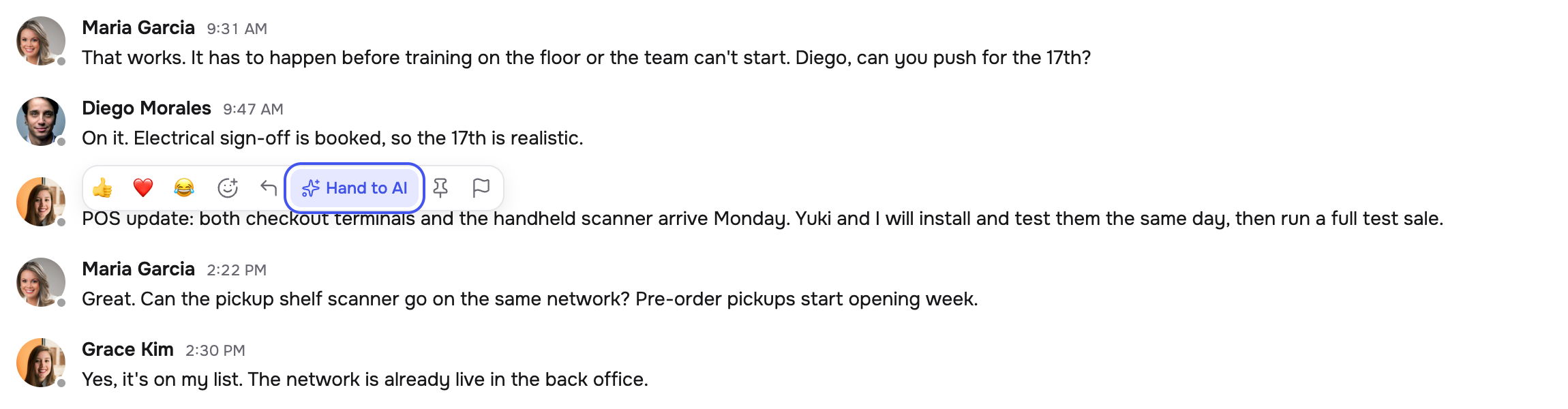
Turn a teammate's message into work for AI: say what it should do, and it lands as an item on a board with the message quoted, so you can follow and approve the result in AI › Runs.
Projects → open a project → Chat → a public roomHover a teammate's message and choose Hand to AI in its toolbar.
02Sign-up and the free plan
Share a link to join a project
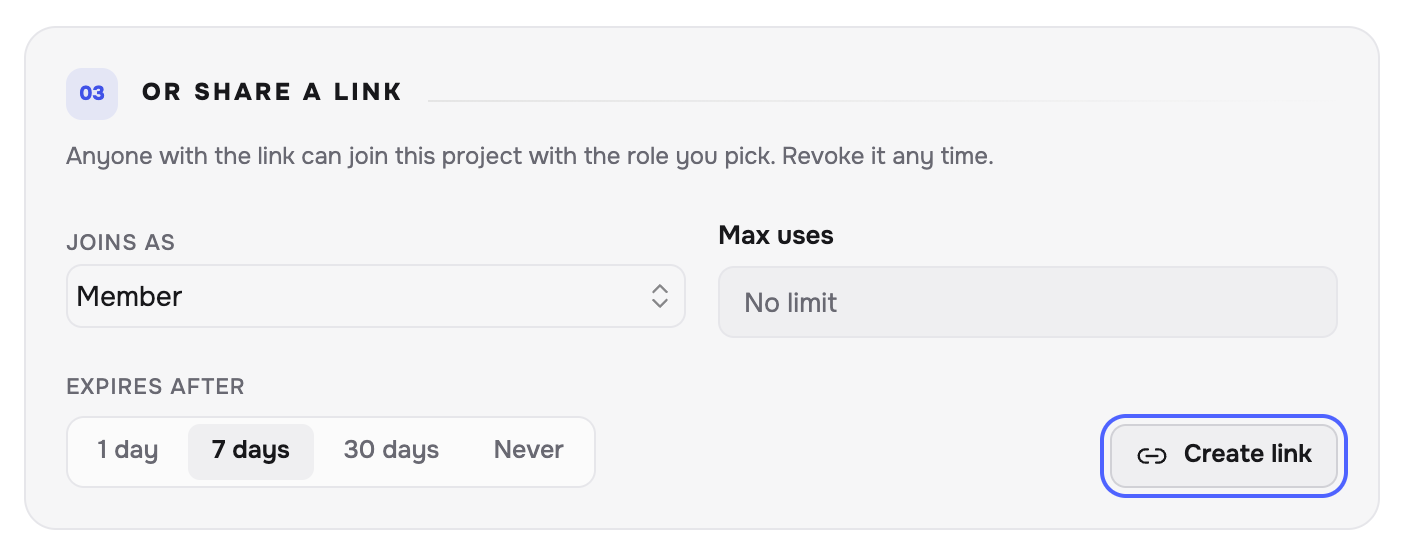
Make a link anyone can use to join your project, with the role they get, when it expires and how many times it can be used. Revoke it any time.
Projects → open a project → InviteIn the invite dialog, scroll to Or share a link, pick the role and expiry, then choose Create link.
03CRM
Website forms that land as leads
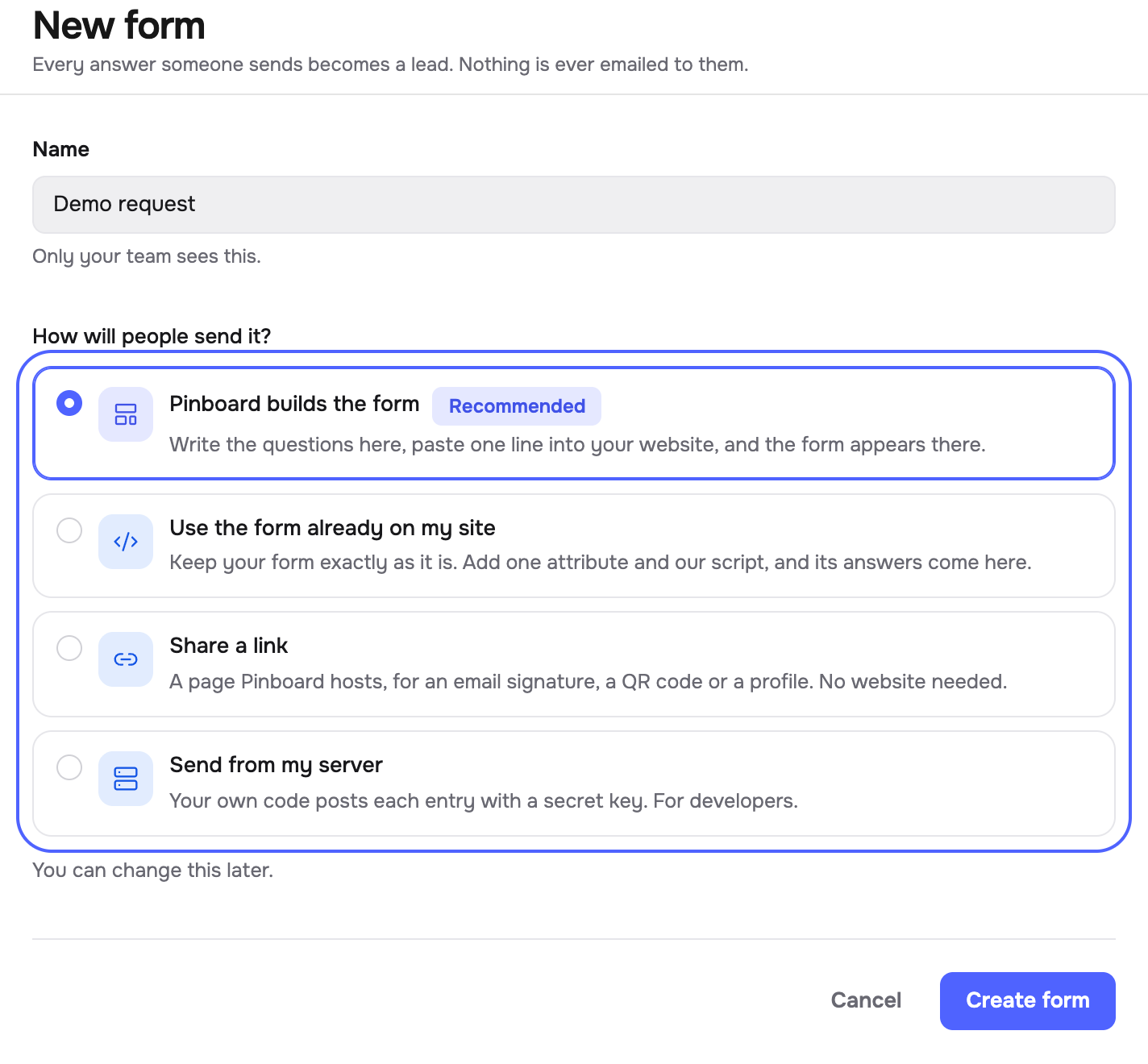
Let Pinboard build a contact or demo form for your website, keep the form you already have, or share a hosted link. Every answer someone sends becomes a lead in CRM.
Projects → open a project → CRM → Settings → Forms → New FormName the form, then choose how people will send it under How will people send it?
Every change
AI
16- NewConnect your workspace's own AI key, and see who can use it, the daily limits and whether the account has run out of credit.
- ImprovedAI is no longer sold as an add-on, a seat or credits; you pay your AI provider directly for what you use.
- NewThe AI panel has a Runs tab listing the work you handed to AI: what needs you, what's running and what's done.
- NewA run's page shows what was asked and the changes to approve all at once or one by one, and Undo run takes them back.
- NewChoose New in Runs to hand AI a piece of work on any board you pick.
- NewHand to AI on a teammate's chat message makes an item, quotes the message and starts the work, without posting anything in the room.
- NewMention @AI in an item's comments to hand that item to AI.
- NewSkills have a description, a trust level that grows with a good record, and an optional check after each change.
- NewTest a skill on its own test board: each case runs twice without changing anything, and you see the cost estimate before it starts.
- NewWhen you decline, edit or undo a change, the run suggests the strongest fix first, like locking a field or adding the case to the skill's tests.
- NewAI can propose calendar events, docs, folders and canvas drawings, and posts in a project's public rooms, for you to approve.
- ImprovedAnything AI would send to a connected service waits for your approval and shows every detail it would send.
- ImprovedWriting help, diagrams and meeting recaps run on your workspace's key.
- NewPick the model for each AI chat, from the set your workspace admin allows.
- ImprovedThe AI panel shows which workspace it's working in, and lets you switch if you're in several.
- ImprovedAn AI field says when it has hit the daily limit or couldn't fill in, instead of staying blank.
Sign-up and the free plan
10- NewAnyone can create an account from the website, with no waitlist.
- NewEvery new workspace starts on the free plan, and your first project needs no card.
- ImprovedSign-up has fewer screens and ends on your new project, where the tour starts.
- NewTell us what you'll use Pinboard for and your first project starts from a matching template.
- ImprovedChoose your username on the name screen; it's never made from your email address.
- ImprovedTwo-step sign-in is a reminder on your Overview instead of a sign-up step.
- NewShare a link anyone can use to join a project, with the role, expiry and number of uses you choose.
- ImprovedIf you were invited, signing up takes you straight to that project.
- FixedOpening an invitation and then signing in takes you to the invitation to accept it, instead of a page that wasn't found.
- ImprovedReaching the free plan's project or people limit offers an upgrade instead of an error.
CRM
8- NewWebsite forms: every answer someone sends lands in CRM as a lead, and the form's owner is notified.
- NewPinboard can build the form: write the questions, paste one line into your website, and it appears in your site's own font.
- NewShare a link to a form page Pinboard hosts, for an email signature or a QR code.
- NewKeep the form already on your site: add our script and Pinboard finds its questions, or paste the form's code to set it up.
- NewYour own server can send entries with a secret key, made only when you ask for one.
- NewA new form asks for a name and how people will send it, then opens in four tabs: Set up, Questions, Submissions and Settings.
- NewQuestions shows the details you collect about the person and anything else you ask, beside a live preview.
- NewSubmissions lists held entries to release or discard, and turns any entry into a lead.
Chat
4- NewChat with people outside your workspaces: invite them by email and talk once they accept.
- NewThe People tab lists everyone you work with across your workspaces, online first; pick anyone to message them.
- NewChat requests notify you on the bell, on your desktop and on your phone, and you can turn them off in Notification preferences.
- ImprovedOne search finds people first and then chats, from either tab and from the chat popup in the bottom bar.
Calendar
7- NewRequest time off and keep a list of holidays; both show on the project, workspace and personal calendars.
- NewThe Time off panel shows who's out over the next four weeks, your requests, approvals and holidays.
- ImprovedTime off lowers a person's available hours when you book their work.
- NewShow a board's items on the calendar, and click one to open it on its board.
- ImprovedAn item that spans several days draws as one bar with its full name.
- NewA Mine button on the workspace and project calendars shows only your own items.
- ImprovedCleaner filters, event popup and calendar chips, easier to read in light mode.
Sidebar
4- NewYour personal column has apps, Home, Chat and Time, under a cover with your photo.
- NewThe project column shows its apps as tabs, with More holding the rest; the grid view is still there.
- ImprovedThe app tabs stay at the top of the column as you scroll a long list.
- FixedThe app grid fits more columns in a narrow sidebar, so the tiles stay a sensible size.
Projects
4- NewTurn on Hide member emails in Project settings › Privacy, and people see names and @usernames instead.
- ImprovedThe project dashboard is headed by the project's name.
- FixedProject admins can change a member's role again, instead of being told they don't have permission.
- FixedEvery switch in the role editor now does what it says; switches that controlled nothing are gone.
Service Desk
2- ImprovedThe "we received your ticket" email from a desk's public form is now something you switch on for each desk.
- ImprovedTicket lists and My work open faster in large desks and busy projects.
Site Administration
2- ImprovedSite Administration lives inside the app on your normal sign-in, and the old admin address sends you there.
- NewA Site admin icon on the rail shows how many errors are waiting to be resolved.
Content and boards
6- FixedWeb addresses in a board item's comments are clickable.
- FixedPressing Enter just as the mention list opens picks the item you meant.
- FixedQuick Scratch can save to a project's top level, even when it has no folders.
- FixedBoards with more than 32,000 items open instead of showing an error.
- FixedAdding a dependency between rows moves the rows that depend on it straight away, without another date edit.
- FixedCreating a sheet or workboard no longer fails now and then with an error.
Time
1- FixedYour time zone is checked before it's saved, and you're told what to type instead of seeing an error.
Arcade
3- ImprovedLookout stays sharp and smooth while you pan and zoom.
- ImprovedSeek has a smaller board that keeps most of the words.
- ImprovedEvery daily puzzle shares one header with the date, the timer and its difficulty.
Website
3- ImprovedSign-up buttons on the website go straight to creating your account.
- NewProduct and solution pages play live demonstrations of the real app.
- ImprovedA new night-sky hero draws light around the app window as the page loads.
API tokens
2- FixedA token made with Full access can upload files.
- NewProject and workspace tokens can be given permission to upload files.
Everywhere
3- ImprovedWhen your network blocks Pinboard, as some hotel or office Wi-Fi does, the app says Can't reach Pinboard and offers network advice.
- FixedA long dialog title wraps instead of pushing the close button off the edge.
- FixedTools without a page yet no longer show a card that opened an error.