

39 changesLatest
Your week at a glance, a lighter Boards page, and agents with a softer look
Home shows what is late, what is due and where your time goes, boards get a white page with lighter tables, the AI names rows by the number you see and can tidy your own chats, and everything an agent can wear is redrawn, with rewards earned by the runs your agents finish.
- 21 new
- 9 improved
- 9 fixed
On this page9 sections
Highlights
01Home
Late work in one list
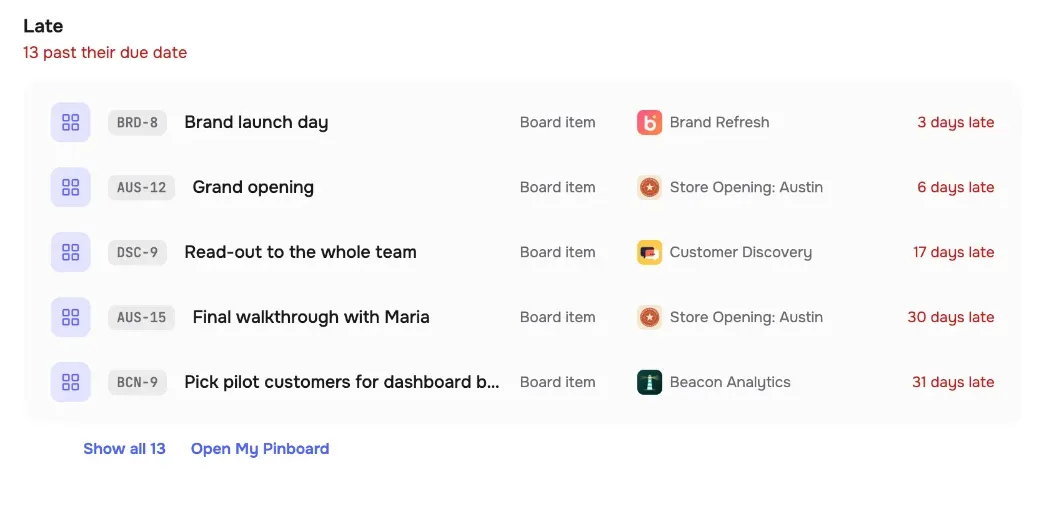
Home now starts with everything past its due date, board items, tickets and to-dos together, and shows where your time is going beside it.
HomeOpen Home and look at Late; choose Show all to see the rest.
Every change
Home
5What to expect
Your week is built from what you do. Late, Today, Tomorrow and Rest of the week list your meetings, board items, tickets and to-dos. Where your time is going counts a day in a project when you did something there yourself or logged time to it; changes made by an agent, an automation or an import don't count, and nor does just opening something. Time you may not have logged appears only if you log time.
- NewLate lists everything past its due date in one place, board items, tickets and to-dos together, with the most recently late first.
- NewToday, Tomorrow and Rest of the week list your meetings, the work due and your to-dos, each marked with what it is and its project.
- NewWhere your time is going ranks the projects you worked in over the last two weeks, with the hours you logged.
- NewTime you may not have logged lists the days you worked in a project without logging time to it, with a button to log it.
- ImprovedSummarize my day moves up into the page header.
Boards
3What to expect
The white page and lighter tables show on larger screens. Phones keep the gray page, where each item is its own white card.
- ImprovedA board now sits on a white page, with each group's table in a lighter shade and a faint edge, so the board reads as the page rather than part of the frame.
- ImprovedSub-item rows take their own softer shade in the table and the timeline, and the timeline's fold control sits after the title, the same as in the table.
- ImprovedTimeline rows are a little tighter.
AI assistant
5What to expect
The assistant reads a board the way you see it: the number in the # column, and the rows currently in view. Archiving works only on chats you started yourself, never the chat you are in, one still working, or anyone else's. Ask it to bring them back and they return.
- FixedThe assistant names board rows by the number on screen, and "these" means the rows in view, so it no longer talks about rows nobody can see.
- NewAsk the assistant to archive your own chats, such as "archive my chats older than 2 days", or to bring them back.
- FixedWhen you send a new message in an item's thread, the changes still waiting for your approval above it are closed instead of staying on offer.
- FixedA reopened chat says which replies were already undone.
- FixedThe daily brief follows the model your workspace is set to use.
Notifications and accounts
4What to expect
If another account you are signed in to on the same browser or phone is a member of the project, tapping a notification, an email link or a shared link opens it in that account. You see Access Denied only when none of your signed-in accounts can open it. A browser alerts you for every account signed in on it.
- FixedTapping a notification for another account you are signed in to opens it in that account, on the phone and on the web.
- ImprovedA browser now sends notifications for every account signed in on it, not only the last one.
- FixedMentions, comments and assignments each keep their own notification; only a bulk edit is summed into one.
- ImprovedThe emailed sign-in code is kept more safely. Codes sent before this release stop working, so ask for a new one.
Editor
2What to expect
These fixes apply to the description box on board items and tickets.
- FixedTyping @ in a board item or ticket description now finds people, tickets, board items and notes in the project.
- FixedReset clears a draft on an item that had no description to begin with.
Sidebar
1What to expect
Phone sheets keep scrolling as one piece.
- FixedOn desktop the header and the app dock stay put, and only the open app's panel scrolls.
Agents
6What to expect
Rewards show on the Agents page's Rewards tab and unlock when an agent you made finishes enough runs. An item's special colors unlock only once you have the item. The bunny set has been retired, and its ears and sticker come off any agent that wore them.
- ImprovedEverything an agent can wear is redrawn with soft shading, highlights and finer detail, from hats and glasses to the holiday, sports and creature sets.
- NewWear any item in any agent color, or set it to match the agent's own color.
- NewSome items have special colors you earn by using your agents, such as tortoise glasses, a forest beanie, silver headphones or a gold headband.
- NewTwo new fills, Pearl and Anime, are earned after 70 and 200 finished runs.
- ImprovedRewards that used to come with an agent's age now come from the runs your agents finish, so using your agents is how you earn them.
- NewAn agent can hold a pose while it works, such as typing dots or cog eyes, and play an emote you pick when it finishes.
What agents can do
13What to expect
Reading the web is off until a workspace admin turns on AI can use the web, and each agent has its own Search the web switch, off by default. Talking to agents from a chat app needs an admin to set up that app's bot first; you then link your own account from Settings › Chat apps with a code and a YES in a direct message. Anything an agent would change from a chat app, the web or an outside agent still comes to Pinboard as a change for you to approve.
- NewBuild an agent by chatting: describe what it should do and the form fills in beside the chat. Or start from one of 22 ready-made agents, grouped by what they help with.
- NewGive an agent a monthly credit budget, never above your workspace's limit. Its owner is told at 80, 90 and 100 percent.
- NewAn agent's Activity tab shows what it cost, a log of its runs you can download as a CSV, and charts. A failed run says why in plain words, suggests one fix and tells the owner.
- NewEach agent has its own memory that you can open, edit or switch off.
- NewEvery save of an agent's settings can be undone, and History lets you go back to any earlier version.
- NewAgents and the AI assistant can read a public link you give them and search the web, citing their sources.
- NewTalk to your agents from Slack, Microsoft Teams, WhatsApp or Telegram.
- NewConnect an agent you run yourself, such as one behind your own web address. It can ask to join, an admin approves it, and it shows under Settings › AI › Connections with a Revoke button.
- NewTurn on Do simple commands instantly so a plain request to an agent, like moving an item, happens right away. Chat with this agent starts a chat with it.
- NewA skill can be always on for the people you choose, and shows an On badge in the / list.
- NewPinboard suggests skills from requests you make again and again, and Write like me drafts a private skill in your own writing style.
- ImprovedAgents fit a phone: bigger controls, and a notification when a run fails.
- NewIn the desktop app, press Cmd+Shift+A (Ctrl+Shift+A on Windows), or use the tray menu, to ask the AI a quick question from anywhere.