

41 changes
Link your sign-in accounts, a simpler timesheet, and a smoother phone
Link and unlink Google, Microsoft and GitHub sign-in, find your daily hours on Entries, and get billing, settings and My Pinboard that fit your phone. Plus a clearer Privacy Policy and an Accessibility page.
- 4 new
- 23 improved
- 14 fixed
On this page12 sections
Highlights
01Sign-in accounts and security
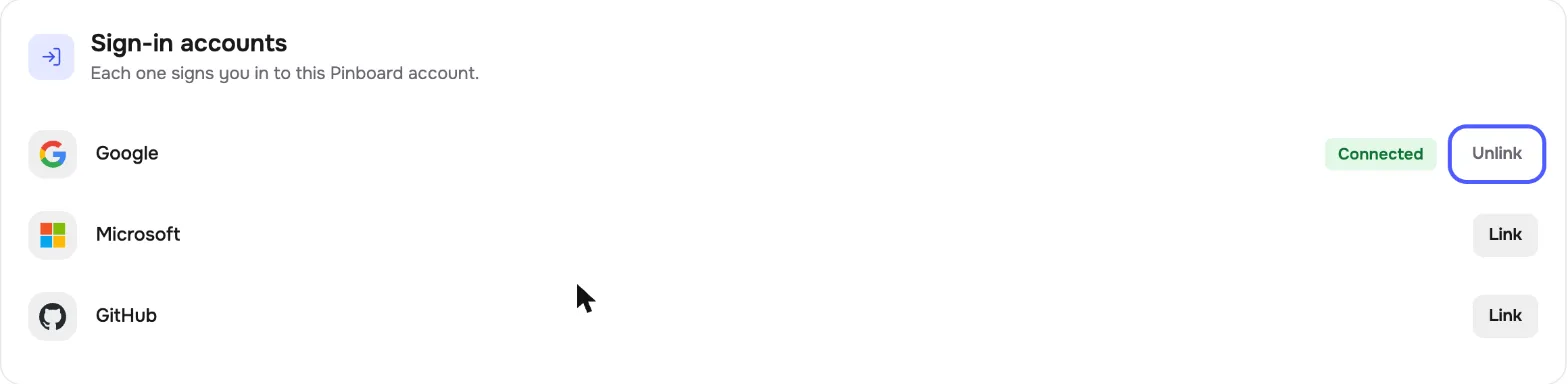
Link and unlink the accounts you sign in with
Add Google, Microsoft or GitHub to your account, or remove one, without creating a second account.
Settings → Connected accountsChoose Link beside a provider to add it, or Unlink to remove one you no longer use.
02Timesheet
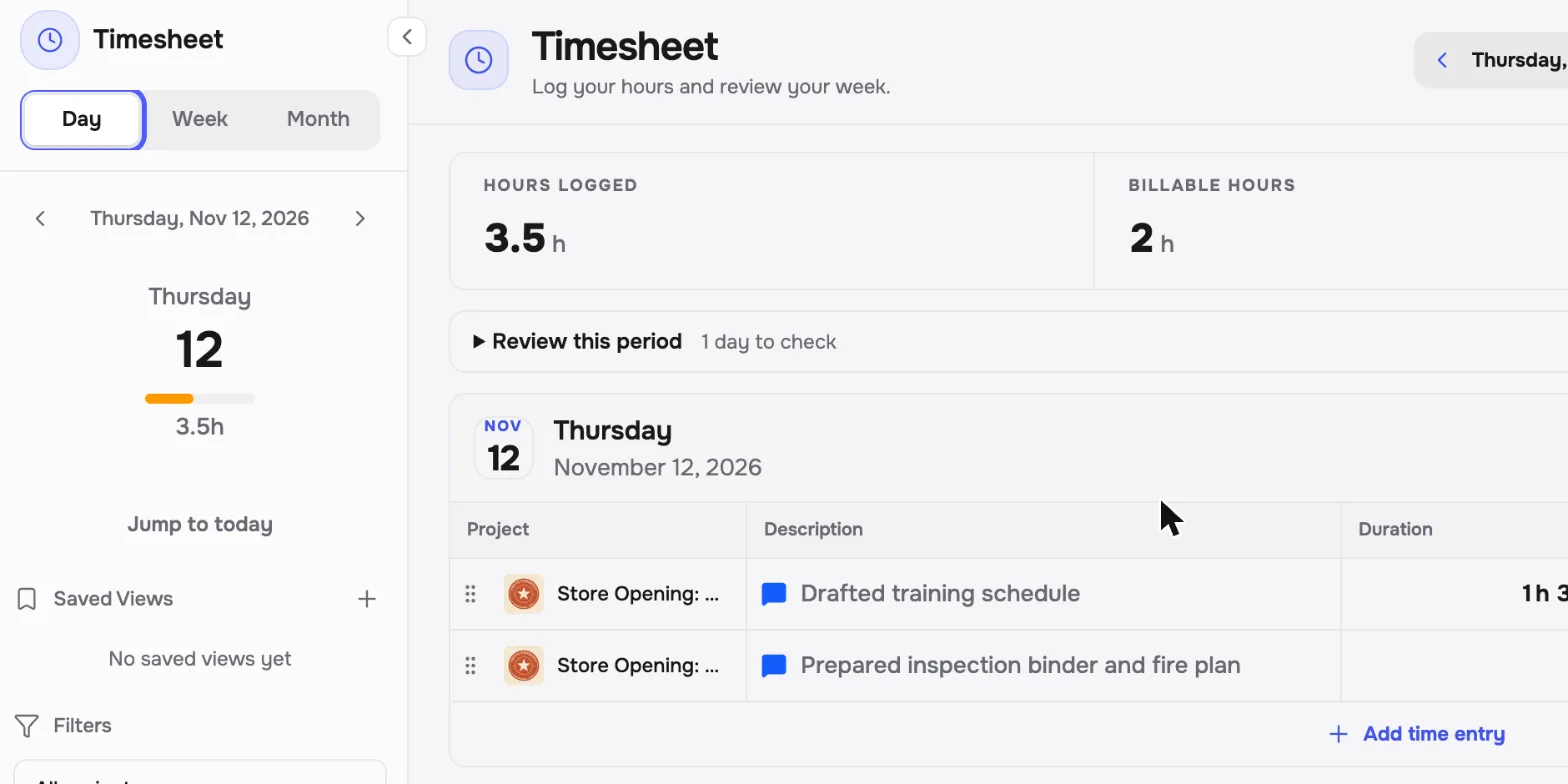
Daily timesheet is now Day view
Log and review one day's hours on Entries, with the same filters and totals as the week and month.
Timesheet → Entries → DayChoose Day in the switch at the top of the left panel.
Every change
Privacy and accessibility
3What to expect
Nothing to set up. If you already accepted the 2026-11-09 Terms, you aren't asked again. New accounts accept the 2026-11-14 Terms and Privacy Policy.
- ImprovedThe Privacy Policy now describes session recordings and click maps, and how long they are kept.
- NewAn Accessibility page says what we aim for, what doesn't work well yet and how to report a problem.
- FixedAnyone still asked to accept the Terms sees the current version, not an older one.
Sign-in accounts and security
5What to expect
Find these under Settings › Connected accounts and Settings › Security. You can only unlink a sign-in method if you have another way to sign in. Apple can't be added from the web, so it appears only once it is linked.
- NewLink or unlink Google, Microsoft and GitHub sign-in from Settings › Connected accounts, even when the provider's email differs from your Pinboard email.
- ImprovedSettings › Connected accounts lists only the accounts you can sign in with, and tells you plainly when a link or unlink didn't work.
- ImprovedSettings › Security shows whether password sign-in is On or Not set up.
- FixedDeleting your account now also ends Sign in with Apple access for Pinboard.
- FixedSwitching back to an account you were just using no longer says "Session expired", and signed-out accounts can be removed from the account menu.
Timesheet
6What to expect
Entries opens in Day view when you follow an old Daily timesheet link. Project time lists show only your own hours if you haven't joined the project; the list says which you are seeing.
- ImprovedThe separate Daily timesheet page is gone. Day view on Entries does the same job, and old links open it on the right date.
- NewOn a phone, the time list is one row per entry, grouped by day, with hours and billable status on the right.
- ImprovedThe Timesheet dashboard shows this week's real status: Submitted, Approved, Returned for correction, Withdrawn or Reopened.
- ImprovedThe Time pages share the same page title and one-line description as the rest of Pinboard, and an empty day is one slim row.
- FixedA project's time report and entries list now show the same hours, and both say whether they show everyone's time or only yours.
- FixedAn empty week no longer says "Not submitted", and project time tabs say when they couldn't load.
Billing
3What to expect
Open Billing from a project or from the workspace. The tabs now behave the same on a phone and a computer.
- ImprovedContracts, Master agreements, Invoices and Payments tabs have the same look as the rest of Pinboard, with one main button each.
- ImprovedOn a phone, billing lists become stacked rows and contract amounts fit three across.
- FixedIf billing information can't load, you now see "Couldn't load" with Try again instead of a message saying there is nothing there.
Dashboards and project pages
4What to expect
Applies to project and Service Desk overviews, project calendars and project time.
- ImprovedProject and Service Desk overviews have one header, with Shared with project, Present and Customize beside each other.
- ImprovedOn a phone, number tiles on overviews sit two across instead of one per screen.
- ImprovedA project's calendar uses the same toolbar as My calendar, with a filled Today button and a Week and Month switch.
- FixedThis week, Up next and project time say when they couldn't load instead of showing an empty list.
My Pinboard on phones
3What to expect
Applies to phone-sized screens.
- NewItems in My Pinboard are cards showing status, due date, title, who has it and the board. Hold a card to select several, then Pin or Unpin.
- ImprovedAn item opens full screen on a phone, and the item panel reads cleanly.
- FixedEdits made in the item panel now refresh My Pinboard right away.
Settings pages
5What to expect
Find these under Settings.
- ImprovedSettings › Notifications says Assigned work and offers only switches that do something.
- ImprovedAPI keys, My AI, Email signatures and Connected accounts use full-width settings cards and show clear messages when something can't load.
- ImprovedCreate token now sits in the API keys header, and tells you why a token couldn't be created.
- ImprovedSettings › My AI › Preferences no longer shows settings that did nothing.
- FixedAPI keys and My AI connections fit on a phone.
Chat and Arcade
4What to expect
Nothing to set up.
- ImprovedThe Arcade has a new look: a page header, game cards, filters that wrap on a phone and game pages that share the home page's layout.
- ImprovedChat's Play a game opens a simple dialog listing games with Invite this chat.
- FixedThe reaction picker and the More menu in chat close each other instead of overlapping.
- ImprovedChat search, checkboxes and menus match the rest of Pinboard.
Phone and favorites
3What to expect
Applies to the phone and favorites rail.
- ImprovedThe notifications drawer on a phone slides closed to the right.
- ImprovedNew favorites folders are named in place, and the folder opens inside the screen on a phone.
- FixedOn a phone you can drag a favorite into a folder, and the Home drawer shows the same rows as on a computer.
Pinboard apps for iPhone and iPad
3What to expect
Update to the latest app from the App Store.
- ImprovedOn the iPhone Duo, the clock column is hidden and pages use the full width, including when folded.
- FixedOn iPad, the window controls no longer cover the left end of the header.
- FixedDialogs and the What's New window stay clear of the iPhone status bar.
Activity and AI
2What to expect
Nothing to set up.
- FixedA change to one sheet cell now reads in plain words in Activity.
- ImprovedThe unused AI insights area is gone from My AI.