

46 changes
One AI assistant that works across your apps, Kanban lanes in color with late dates, and sub-items that read as one family
Pinboard AI is now one assistant with the right tools for each app, answers faster, asks before it changes things that matter, and knows what is on your screen. Boards get colored Kanban lanes, late dates and a clearer sub-item layout.
- 15 new
- 21 improved
- 10 fixed
On this page8 sections
Highlights
01Boards
Kanban cards that say when they are late
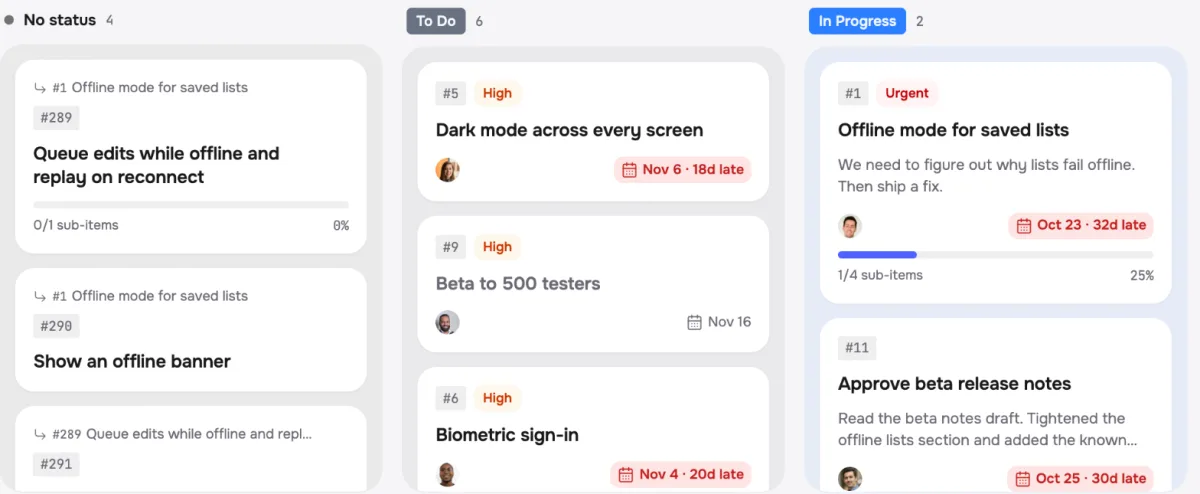
Kanban lanes wear their status color, and a card's due date turns into a chip that says how late it is, so the cards behind are the ones the Overdue count counts. Table rows mark late due dates the same way.
Content → open a board → KanbanLook at the date on each card: a red chip such as Nov 6 · 18d late marks an unfinished item past its day.
02Boards
Sub-items that read as one family
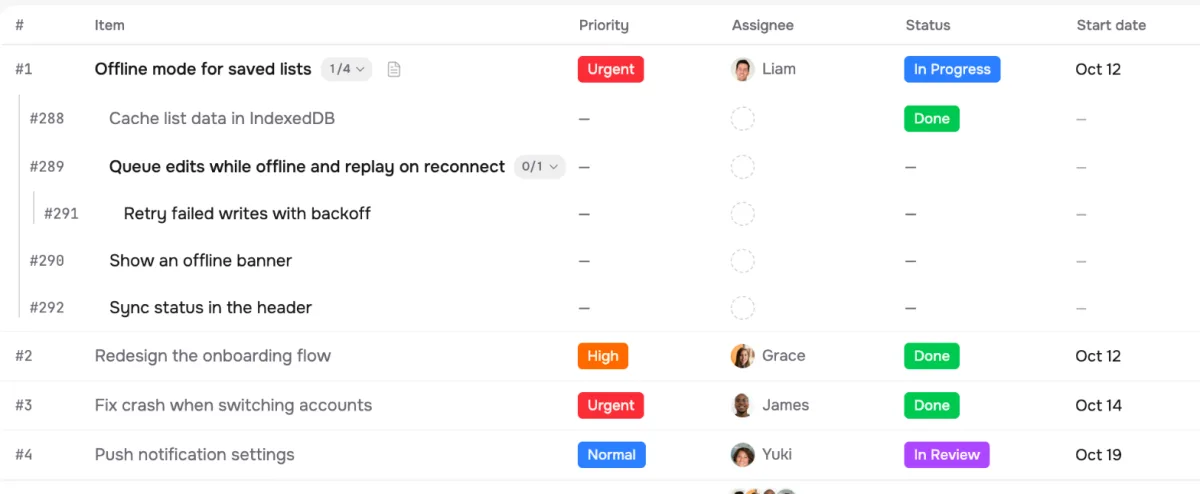
Sub-items step in under their parent with a straight guide line, numbers included, and an item's side panel now lists its sub-items with how many are done. A sub-item names its parent above its title.
Content → open a board → TableChoose the count beside an item's title, such as 1/4, to fold or unfold its sub-items.
03Agents
Make your AI's face your own
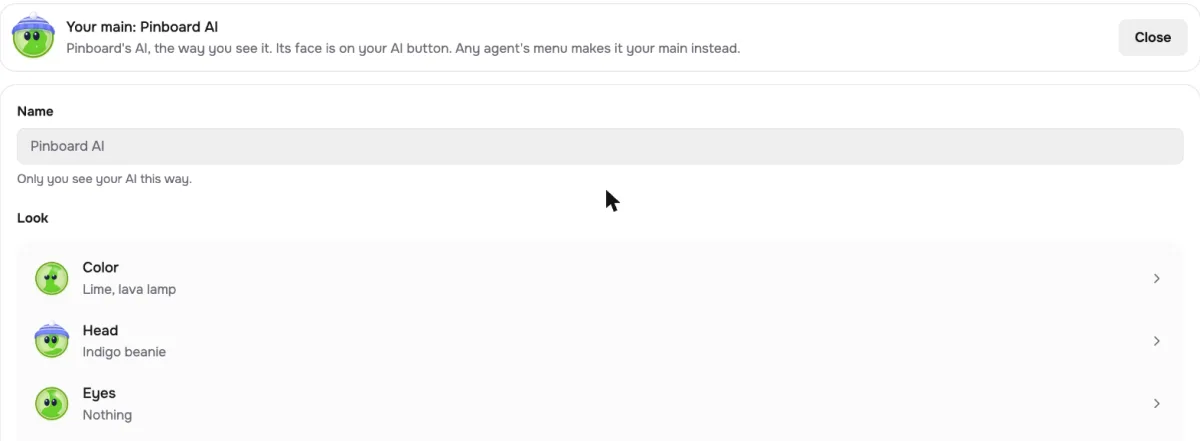
Give the AI button your own name and look, including a fluid fill where liquid drifts in the color you pick. Only you see your AI this way.
Workspace → AgentsChoose Change look on the Your main card at the top of the page.
Every change
Pinboard AI
21- NewAI chat is now one assistant with tools for each app, and a fast first step that decides what to do, so most requests start sooner.
- NewWhile it works, the chat says what each step is doing.
- NewAsk how to use Pinboard and the AI answers from Pinboard's own help, labeled as such, with a link to the page.
- ImprovedQuestions about something written down are answered from your notes and files first, from any page, and a total or full list reads the whole note instead of one passage.
- ImprovedThe AI knows what is on screen on most pages: the open board item, ticket, checked rows, report lists, workspace people and projects, search results, team chat, time views, bookings, collections, automations, agendas and the service desk's approvals, SLAs and outbox.
- ImprovedThe AI can open an app's page, or a project or item by name, from anywhere, including a ticket by its number.
- ImprovedSaying "show only Maria's items" filters the board you are looking at instead of making a new view.
- NewThe AI can read a form and its responses and change its questions, read and edit sheets and CRM deals, log time on a ticket or board item, and take the actions on any kind of open document.
- NewChanges the AI makes right away are limited per reply, and anything bigger, or in another project than the page's, waits for your confirmation on a card.
- NewType / at the start of the chat box to pick a skill from a list, and keep typing to narrow it. The Skills button is gone. The list works with typing tools for Japanese, Chinese and Korean, and with screen readers.
- ImprovedOnce the AI has asked an agent for help, every change in that reply waits for you as a card, even a small one.
- ImprovedWith many agents to choose from, the AI weighs the ones your request is about, and it asks no agent while agent runs are paused in the workspace.
- ImprovedA Pinlet that can change data now asks on a card before it gets that access, and before an edit to a Pinlet that already has it.
- ImprovedEach AI reply works inside the one workspace you opened it in and cannot reach another.
- NewUndo now covers sheet edits and added rows, the quick notes the AI saves, and a team chat post it made, and it brings back an empty board item description the AI had filled.
- ImprovedUndoing an AI change to a board item leaves a teammate's later edit to that item alone.
- FixedThe chat no longer invents a folder or shows one answer twice, and an answer card shows bold text instead of stray asterisks.
- FixedLogging time on a board item by its number or title works, and asking who is on a project works for any member.
- FixedA chat limited to one note or folder no longer searches its project's old items.
- FixedThe white strip under the last chat message is gone.
- ImprovedThe Models page says which model is the default and describes each model in plain words, and Providers lists Pinboard AI.
Boards
8- NewKanban lanes take their value's color, and a card's date is a chip that says how late it is, or that it is due within three days.
- NewA table row's due date is marked late or due soon the same way, and the hover says how late. Screen readers hear the word, not only the color.
- ImprovedSub-items step in one level at a time with a straight guide line, and the add row sits under the last sub-item and stays open for the next one.
- NewAn item's panel lists its sub-items with a count of how many are done, lets you add one, and opens any of them. A sub-item shows its parent above its title.
- ImprovedThe board table sits on the gray canvas with each group as its own card, column headers are in sentence case, dates drop this year's year, and assignees show a first name.
- ImprovedRename a board where its name stands: double-click, then Enter or click away to save.
- FixedThe date picker no longer runs off the window.
- FixedThe item panel no longer scrolls sideways on a phone.
Agents
6- NewYour main: give the AI button your own name and look, or make any agent you can see your main. Only you see it that way.
- NewA bot's color can be fluid, with liquid drifting in its own color, and a bot can show how far along its work is as a ring or a fill.
- NewCreature sets for bots and a lava lamp fill are rewards you unlock, with a notification that opens the Rewards tab.
- ImprovedAn agent with a color outside the palette can be saved again, and a shared agent's Runs on list no longer offers its owner's computer or account.
- ImprovedAgents that run on someone's computer sign in with an API key only. A personal subscription sign-in is no longer supported, runner setup says to use an API key, and a computer still on a subscription is labeled as not supported.
- ImprovedCursor and Copilot agent runs refuse when AI is switched off for the workspace, like every other agent.
Chat
4- New@mention an AI agent in a direct message, group or project room to bring it in for one reply.
- ImprovedAdding an agent to a chat is no longer offered, and agents already on a chat's members are removed from it.
- ImprovedBuilt-in bots (task, poll and reminder) and webhook bots are retired. AI agents are the only kind of bot in chat, and any that are left are switched off and removed from their rooms.
- FixedOld one-to-one chats with the AI leave the chat list and its unread badge.
App layout
5- NewThe top bar, the app rail and the bottom toolbar share one fill, and the page and side panel sit on it as rounded sheets.
- ImprovedProject, Home, workspace and timesheet sidebars share one header with the name, one line of facts and plain icon controls.
- ImprovedBadges no longer repeat what you are already looking at, and count what needs you.
- FixedThe bottom toolbar's tools are centered, and its badges sit on their icons.
- FixedSigned-out accounts in the avatar menu show their full name and email.
Projects
1- FixedControls that change data are now switched off across an archived project's pages, including the service desk, CRM, content, chat, time, reports and settings.
Service Desk
1- ImprovedPeople on the desk are called teammates, and agent always means the AI.