

75 changes
A free plan, one page for AI, and a switch that turns AI off
Start on the free plan and move to Team or Business when you need more. Agents, skills, AI providers and who can use AI now sit on one AI page, and an admin can switch AI off for a workspace, a project or a person. Every AI chat is one thread, and inviting people to a project takes one step per person.
- 41 new
- 17 improved
- 17 fixed
On this page16 sections
Highlights
01Plans and billing
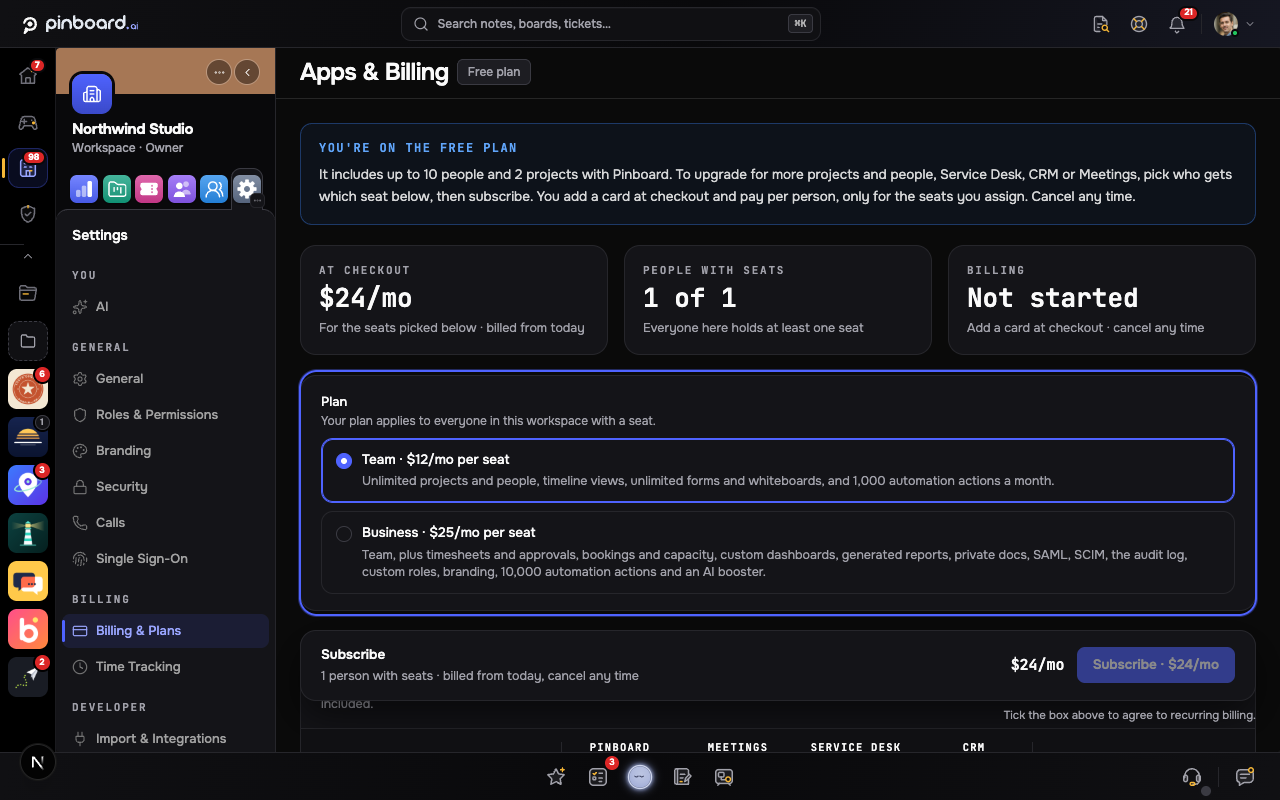
Start free, upgrade when you're ready
Every workspace starts on the free plan. Move to Team or Business when you need more people, projects or features, and add an AI booster for more AI each month.
Workspace → Settings → BillingChoose Team or Business on the Plan card.
02Who can use AI
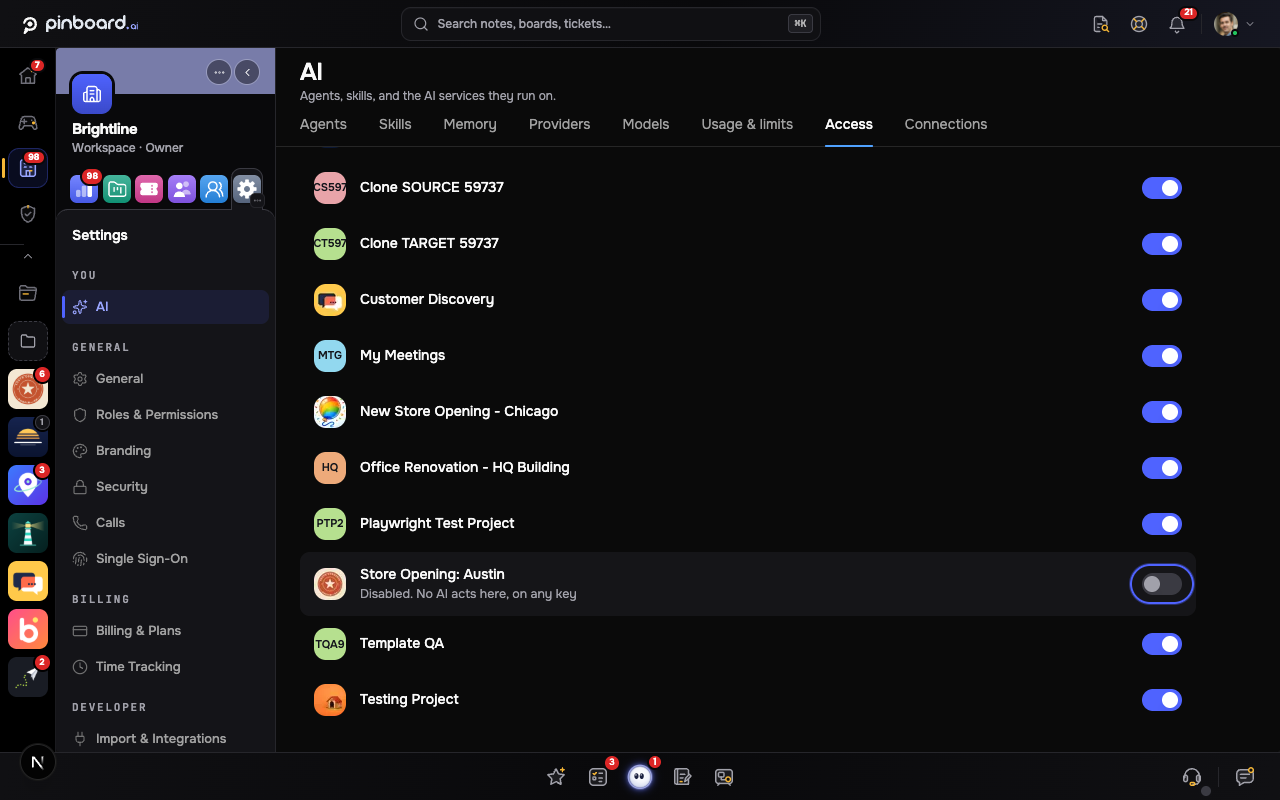
Decide who can use AI
Switch AI off for the whole workspace, one project or one person. Where it's off, nothing is sent to any AI provider, on any key.
Workspace → Settings → AI → AccessUse the switches for the workspace, each project and each person.
03Agents & skills
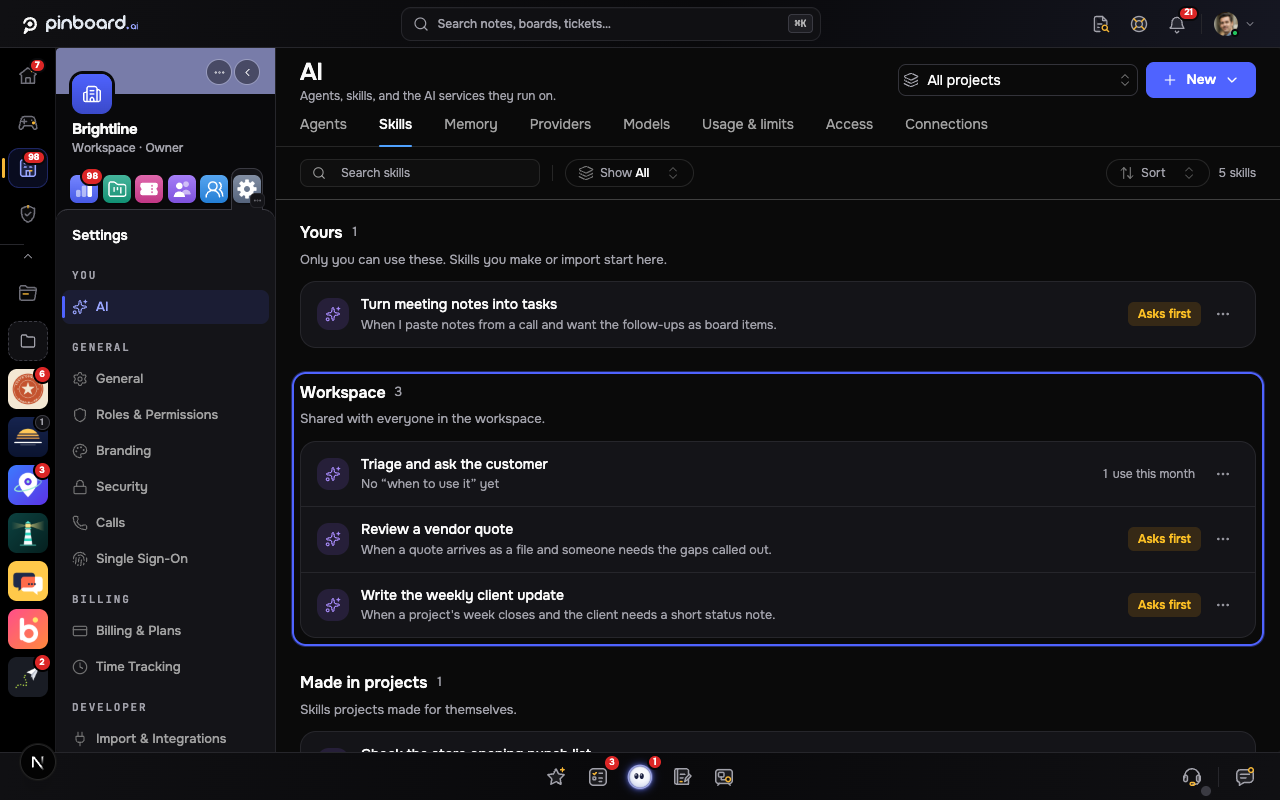
Teach your agents with skills
Write a skill once, or import one, and give it to any agent: yours alone, a project's, or the whole workspace's.
Workspace → Settings → AIOpen the Skills tab and choose New to write or import a skill.
Every change
Plans and billing
7- NewA free plan: start a workspace and invite your team without paying.
- NewTwo paid plans, Team and Business, chosen for the whole workspace.
- NewPick or change your plan from Billing, with a confirmation before anything is charged.
- NewAdd an AI booster for more AI usage each month, or remove one. Business includes one.
- NewWhen you reach a free plan limit, Pinboard says which plan lifts it.
- ImprovedThe pricing page compares the free, Team and Business plans.
- FixedA workspace that's past due can't add an add-on until the payment goes through.
Who can use AI
5- NewSwitch AI off for a whole workspace.
- NewSwitch AI off for one project, from the Access tab or the project's own settings.
- NewSwitch AI off for one person, or for chats that aren't about a project.
- NewThe message box says when AI is off for you, and why.
- ImprovedKnowledge base bots and chat bots say so when AI is off, instead of failing quietly.
AI
21- NewOne AI page for agents, skills, memory, providers, models, usage and access, in workspace Settings.
- NewAdd an AI provider, then configure its key, who can use it and which models are allowed.
- NewTurn off models your workspace shouldn't use; they show greyed in the model picker.
- NewMonthly spending caps for the whole workspace and for each person, with a usage meter in the message box.
- NewMy AI, in your profile: your own AI keys, preferences, connections and your own monthly cap.
- NewEvery AI chat and every piece of work you hand to AI is one thread, with live steps as the AI works.
- NewStart a New chat and @ an agent, a board or an item; handing off work now starts there too.
- NewRename, archive, open the item for, or delete a thread from its menu.
- NewReview an agent's proposed changes one at a time, before and after, in the board's own colors, then apply them with one click.
- NewWorkspace facts: an admin can approve something for the assistant to remember for everyone in the workspace.
- NewAI answers drawn from the wiki say who verified the page and whether that still holds.
- ImprovedRefreshing the page or closing the tab mid-answer no longer stops the AI; the answer picks up where it was.
- ImprovedA new message box with one workspace and project picker and a faster model picker.
- ImprovedThe model picker has a Use your own key link when your workspace hasn't connected the provider you want.
- ImprovedAI answers are formatted the way you'd expect, with headings, lists, tables, code and math.
- ImprovedThe AI badge counts threads waiting on you, and the toolbar shows what the AI is doing.
- ImprovedThreads shows just New chat, AI settings and usage.
- FixedOpening a thread lands on its newest message.
- FixedOlder AI work that still needs you shows up in Threads.
- FixedA failed AI answer never shows its internal workings in the chat.
- FixedSomething you asked the AI to remember is answered plainly, without a reference number.
Agents & skills
9- NewA skills library: write a skill once and give it to any agent. Skills can be yours, a project's or the workspace's.
- NewImport a skill from a link, a zip or pasted text, and see what it contains before you add it.
- NewA skill editor with / for formatting and @ to point at boards, items and inputs.
- NewAgents at three levels too: your own, a project's, or the workspace's, and you can switch an agent off in one project.
- NewShare your own agent with specific people or everyone, let them make a copy, and find agents others shared in Shared with you.
- NewAn agent working in the background can search its project's documents and saved facts.
- ImprovedAgents and skills have search, sort by use and paging for long lists.
- FixedYou can try again straight after an agent run fails.
- FixedAn agent run that uses a skill finishes, and every run records its cost.
Search
3- NewOn a paid plan, search finds a page that answers your question even when it's worded differently.
- ImprovedResults favor rarer words and pages titled after what you asked, and the same text appears once.
- FixedAttachments keep the same audience as the item they're on in search results.
Connected AI apps
2- NewYour AI app can ask a question of your wiki, notes, files, transcripts and knowledge articles.
- NewYour AI app can upload a file straight onto a board item.
Wiki
2- NewChoose how long a verification lasts when you verify a page.
- NewPages past their date show as lapsed, and the verifier is reminded.
Chat
3- New@ an agent in a chat and it answers there; several agents answer in turn.
- NewTurn a chat message into a tracked task with "Track this as a task?", and the task card links back to it.
- FixedThe picker closes when you choose, a chat keeps its project, and usage shows as a percentage.
Boards
6- NewSet a work-in-progress limit on a lane.
- NewA column footer can show the total, average, smallest or largest value.
- NewItems show when AI is working on them.
- NewA comment an agent posts for you shows who it's from and that it came via the agent.
- ImprovedHanding a task to AI marks it in progress and assigns it to you when it has no one.
- FixedRenaming or deleting a tag only changes that project's tasks.
Sheets
2- ImprovedClearing many cells shows "Clearing…" until it's done, then offers Undo.
- FixedIf a clear fails, the cells are put back.
Content
2- ImprovedThe sidebar lists folders and files A to Z and opens only the branch you're in.
- FixedA quick scratch recording saves to the project's Recordings folder again.
Projects and invites
5- ImprovedA simpler project invite: choose Member or Guest for each person, and members get every app the project uses.
- NewCopy each invited person's own invite link, from the invite window or the Pending tab.
- NewLimit who can invite people to a project to roles you choose.
- ImprovedProject Members settings has Active and Pending tabs.
- FixedSomeone already in the workspace can be invited to a project again.
Service Desk
2- NewSave your own email signatures and choose one when you reply to a ticket.
- NewRemove "Powered by Pinboard" from ticket emails, public forms and the chat widget.
Workspace
5- ImprovedWorkspace settings open in the workspace column, the same way a project's do.
- FixedThe activity feed's search filters the feed.
- FixedThe leaderboard and activity feed say when they couldn't load.
- FixedA workspace's Owner can see its overview numbers.
- FixedThe app uses American spelling throughout.
Terms and privacy
1- ImprovedThe Terms of Service and Privacy Policy, dated November 9, 2026, describe the free, Team and Business plans.