

42 changes
One create-token page, simpler workspace settings, and AI seats you turn on in Billing
Create any API token from one page, find Branding and Ownership in workspace General settings, and turn on AI for your team in Billing. Plus Service Desk tickets that open as full pages and a smoother phone experience across boards, Content, Reports and chat.
- 6 new
- 25 improved
- 11 fixed
On this page12 sections
Highlights
01Service Desk
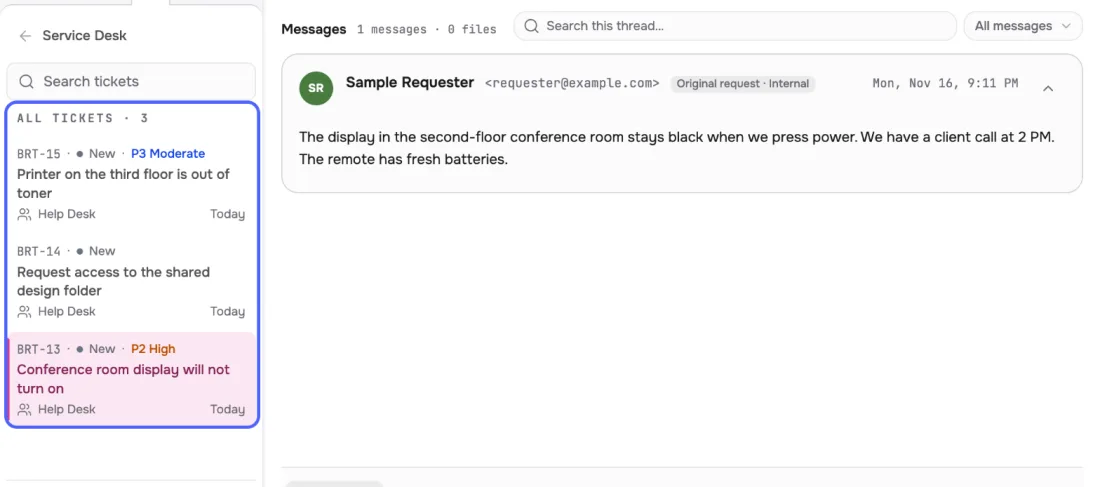
Tickets open as full pages
A Service Desk ticket now opens on its own page, with the ticket list beside it so you can move to the next one without going back.
Service Desk → Tickets → open a ticketChoose another ticket in the list in the project sidebar to switch without leaving the page.
02API tokens
One page to create any API token
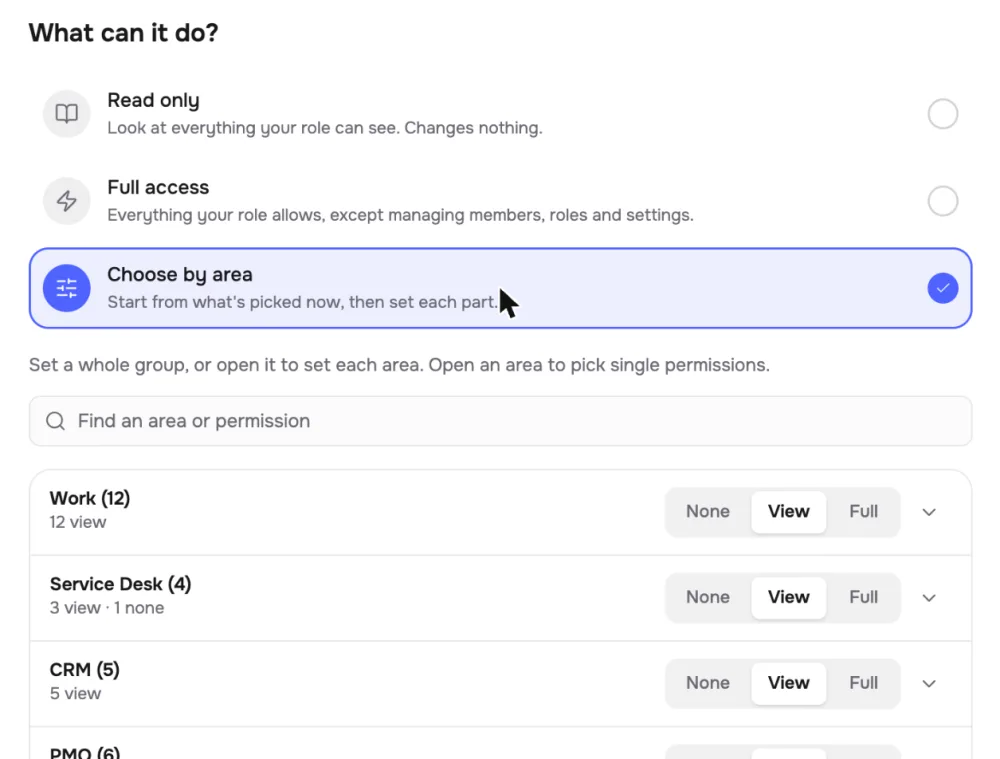
Project, workspace and personal tokens now share one create page, and Choose by area lets you set exactly what a token can do.
Settings → API tokens → New tokenUnder What can it do?, pick Read only, Full access or Choose by area.
03Workspaces
Branding and Ownership now live in General
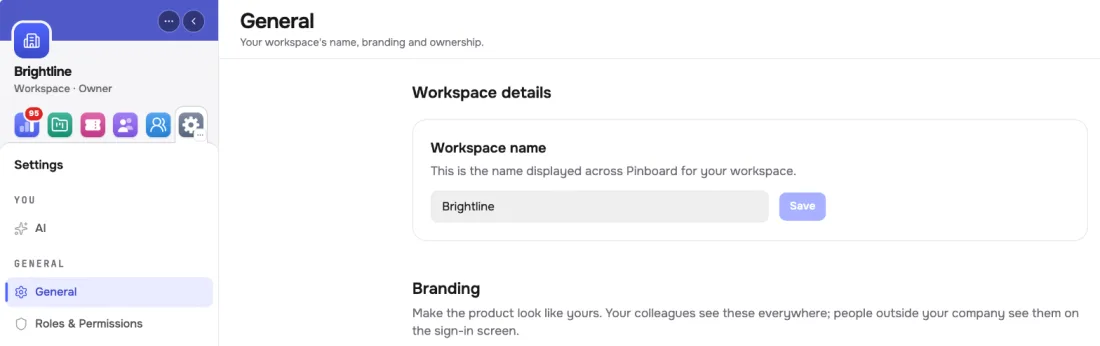
Workspace settings gather the name, branding and ownership on one General page, and the Workspaces list is one list with a menu on each row.
Workspaces → ⋯ → Settings → GeneralOpen the menu on a workspace row and choose Settings.
Every change
Pinboard AI
5- NewTurn on AI for your team in Billing: $12 per person per month, and each AI seat adds $6 of Pinboard AI to a pool the whole workspace shares every month.
- ImprovedAn AI booster adds $6 more to the shared pool for $10 a month. You can add one only while AI is on, and Business no longer comes with one: Team and Business are the same for AI.
- ImprovedYour own AI key still needs AI turned on for your team, and what it uses doesn't come out of the Pinboard AI pool.
- ImprovedWhen the month's Pinboard AI is used up, AI that runs on Pinboard's AI pauses with a clear message, and admins can add a booster or connect their own key. The pool starts over on your next billing date.
- ImprovedBilling shows the total before you turn AI on or off, and how much of the pool is used. People without AI see why and who to ask.
Meetings
3- NewMeetings is on sale again: hosts can be given group video and screen share from Billing, in an invite, or by approving a seat request.
- ImprovedThe All apps rate includes Meetings again when someone holds Pinboard, Service Desk and CRM.
- ImprovedFree plan calls are for two people, and Settings › Calls says plainly what your plan allows.
Workspaces
2- ImprovedWorkspaces is one list, with a menu on each row for Settings and Leave workspace.
- ImprovedBranding and Ownership moved into workspace General settings, next to the workspace name.
API tokens
3- NewOne create-token page for project, workspace and personal tokens, with Choose by area to set what a token can do in each part.
- FixedA new personal token now appears in the list you go back to, and the list always refreshes when it opens.
- FixedA token can now change things only in the areas its own settings allow.
Content and boards
9- ImprovedBoards are now part of Content, and Content has one set of permissions for notes, folders, files and boards.
- NewOn phones, touch and hold to select items in Content and on boards, with no checkboxes in the way.
- ImprovedBoards on a phone show cards, and Kanban and the item panel work by touch.
- ImprovedA collection opens inside Content and says what it is, and its sidebar icon is now fuchsia.
- ImprovedContent lists read at phone sizes, and Content settings and Trash are easier to read and name trashed boards.
- FixedOpen item panels now follow changes other people make right away.
- FixedThe workspace and site roles you had before keep their Content access.
- ImprovedGuests can view boards but not change them, the same as notes, folders and files.
- FixedSomeone invited to a board can no longer change who else sees it.
Service Desk
4- NewA ticket opens as a full page, with the list of tickets in the project sidebar.
- ImprovedArchived tickets are on the list's Archived pill, so the separate button and page are gone.
- ImprovedThe ticket list header and toolbar match the rest of the app and fit a phone.
- FixedTicket volume says when there are no tickets or when it couldn't load, instead of showing an empty chart.
Projects
5- NewOverview has a settings drawer for time entries.
- ImprovedThe project Apps page is rebuilt, and its groups match each app's sidebar.
- ImprovedProject Tools match the rest of the app, and a failed load no longer shows made-up tools.
- ImprovedOn phones, Projects shows as rows and the navigation drawer is easier to use.
- FixedThe transfer code now says where it is claimed.
Reports
6- ImprovedThe report viewer has a cleaner layout with one line of details and a clear message when a report can't load.
- ImprovedBillable detail has the app's look.
- ImprovedThe Marketplace tab is now Report types, and a report type's history is the History tab filtered to it.
- ImprovedReport tables show stacked rows on a phone instead of squeezed columns.
- FixedGenerate report always lets you choose the period.
- FixedReport dates are no longer a day early.
Chat and phones
3- ImprovedChat room headers and tabs are easy to tap on a phone, and timestamps are easier to read.
- ImprovedPeriod chips and toolbar menus are finger-sized, and sheets stay clear of the on-screen keyboard.
- FixedAI buttons now tell you why they're unavailable before you tap them.
Favorites
1- FixedA note you save as a favorite from its project page is saved as that note.
Two-step sign-in
1- ImprovedNew recovery codes are longer, four groups of five characters, so they are much harder to guess.