

48 changes
One AI History, @mentions in notes, a cleaner sheet toolbar, and a faster app
Your AI chats and runs now live in one History, you can @mention people and board items in a note, sheets get zoom and a tidier toolbar, and Content was reworked. The app also opens with far fewer requests, so busy teams stay fast.
- 8 new
- 26 improved
- 14 fixed
On this page10 sections
Highlights
01AI
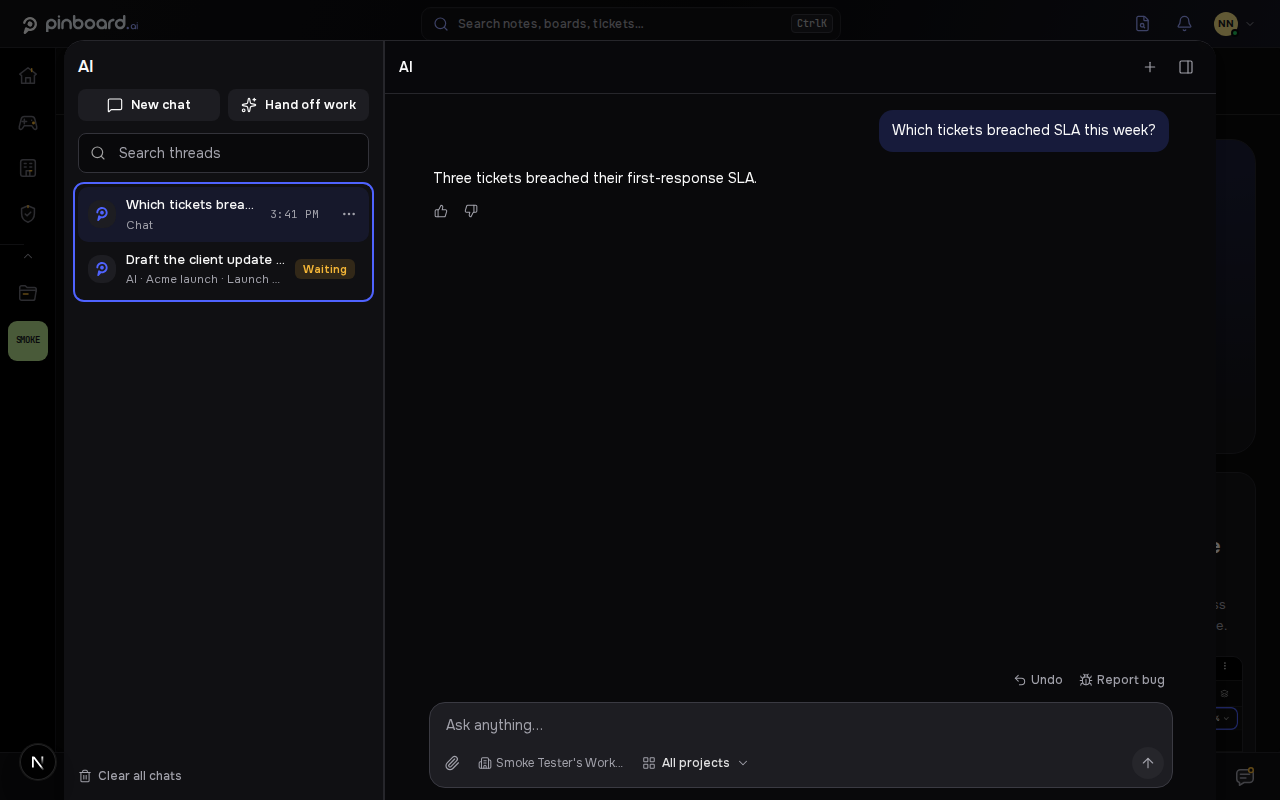
Every AI chat and run in one History
Your Ask chats and the work you handed to AI sit together in History, with Settled and Archived groups, and each thread shows which agent it was with.
AI panel → open full screenChoose Open full screen in the AI panel; your chats and runs are listed together on the left.
02Notes and mentions
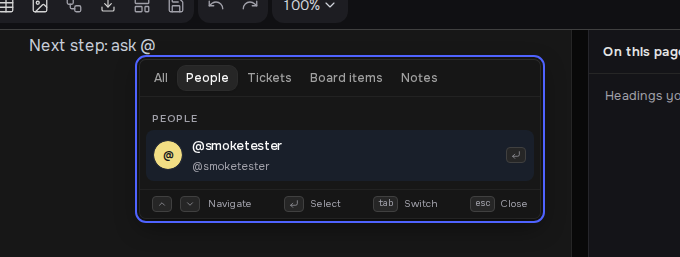
@mention people in a note
Type @ in a note to mention a teammate and they're notified; you can also mention a board item, browsing items board by board.
Content → open a noteType @ in the note and pick a person or a board item from the list.
03Sheets
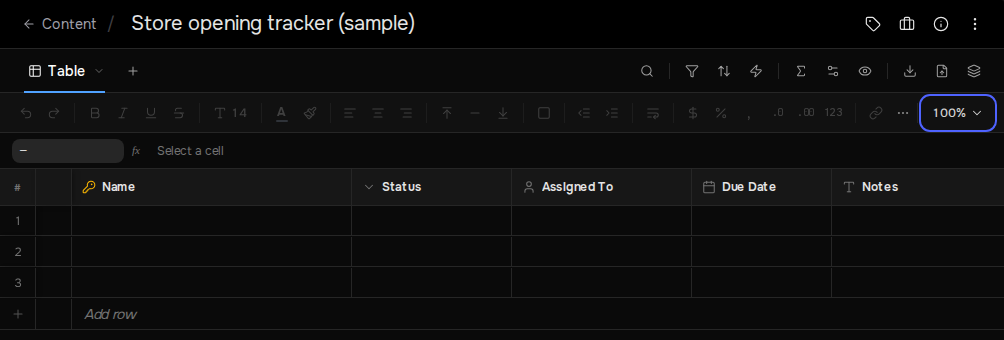
Zoom a sheet without zooming the page
Zoom in or out on a sheet's grid to see more or less of it, while the rest of the page stays the same size.
Content → open a sheetUse the zoom control in the sheet's toolbar.
Every change
AI
9- NewOne History lists your Ask chats and your runs together, with Settled and Archived groups.
- ImprovedFull-screen AI opens over the page you're on, with History as a column beside the conversation.
- ImprovedThe AI chat panel and a run's header have a cleaner look, and a run reads like a conversation.
- NewWhen you hand AI a run, you can pick the model and effort, attach files, dictate and stop it, just as in Ask.
- NewChoose which project Ask answers about.
- ImprovedEach thread in History shows the agent it was with.
- ImprovedA follow-up run on an item remembers the agent's earlier runs on that item.
- ImprovedWhen AI offers to delete a folder, it says how many boards the folder holds.
- FixedUndoing an AI change now checks that you can still make that change, so someone whose role was lowered can't undo their way around it.
Notes and mentions
9- New@mention people in a note, and they're notified.
- New@mention a board item, and the @ picker lets you browse items board by board.
- ImprovedMentioned tickets and board items show as cards.
- ImprovedTab and Shift+Tab switch between the @ picker's tabs, and clicking outside or pressing Escape closes it.
- FixedThe [[ link menu opens above the cursor near the bottom of the screen instead of off the edge.
- ImprovedAn empty Comments panel opens straight to a comment box, and the comment box was rebuilt.
- FixedWide tables in a note scroll sideways on a small screen.
- FixedPressing Enter twice in a checklist inside a numbered list keeps it nested.
- ImprovedViewers get a read-only note.
Content
5- ImprovedContent was reworked: the sidebar shows the whole folder tree, and changes appear the moment you make them.
- ImprovedFolders open faster and show real thumbnails for images.
- ImprovedCards in the grid view line up at the same height.
- NewDeleting a folder takes the boards inside it to the Trash too, for people who can manage boards.
- ImprovedThe list says when a file is private.
Sheets
7- NewZoom a sheet's grid in and out without zooming the whole page.
- ImprovedThe toolbar is a row of icons in three groups, and the sheet summary moved into it.
- ImprovedThe row rail and row tabs stay hidden until you select a row.
- ImprovedGrid lines are lighter in light mode.
- FixedFreezing a column no longer moves it or any other column.
- FixedThe row tree stays on the first column after you reorder columns.
- FixedRow colors now reach frozen columns, and a broken formatting rule is refused instead of saved.
Support
2- NewDescribe the problem in Get Help, and the ticket is titled and filed for you.
- FixedA ticket from a customer form now reaches everyone it should, including the owner of the form's key.
Speed
5- ImprovedThe app opens with far fewer requests, so it loads faster and busy teams aren't slowed down.
- ImprovedIf the app is briefly asked to slow down, it waits quietly and only tells you when the wait is real.
- ImprovedTimeline, Upcoming, Agenda and the daily brief load several times faster.
- ImprovedSearch, unread counts and board edits do less work behind the scenes and respond faster.
- ImprovedLive updates reconnect smoothly after a blip, and several open tabs share one connection.
Projects
4- ImprovedItems made and emails sent with a project's API key name the project instead of the person who made the key.
- ImprovedA transparent project logo sits on white in the project header, so it stays readable.
- ImprovedBoards can be created in, filed into and moved between folders from AI tools connected to Pinboard.
- ImprovedRows in the All apps menu are tighter, and the pin button sits before the badge.
Privacy and safety
5- FixedFiles sent by customers through public forms, live chat and email no longer count toward your storage.
- FixedInviting an email address to a workspace no longer reveals whether a hidden guest already uses it.
- ImprovedChat invitation emails always use the same subject line, whoever sends them.
- FixedPeople outside your workspace no longer see its billing details when chat with them pauses.
- FixedA skill's test results are only written by someone who can edit the test board.
Arcade
2- FixedPausing or leaving a daily puzzle no longer takes it off the leaderboard.
- FixedRuled-out crosses look the same as placed crosses.