

61 changes
Pinboard for Android, with calls that ring like a phone call, and a page for deleting your account
The Android app gets a tab bar, home-screen shortcuts, notifications that name their account and calls that ring full screen. Anyone can now find how to delete a Pinboard account on a public page.
- 18 new
- 17 improved
- 26 fixed
On this page15 sections
Highlights
01Account
A page that explains deleting your account
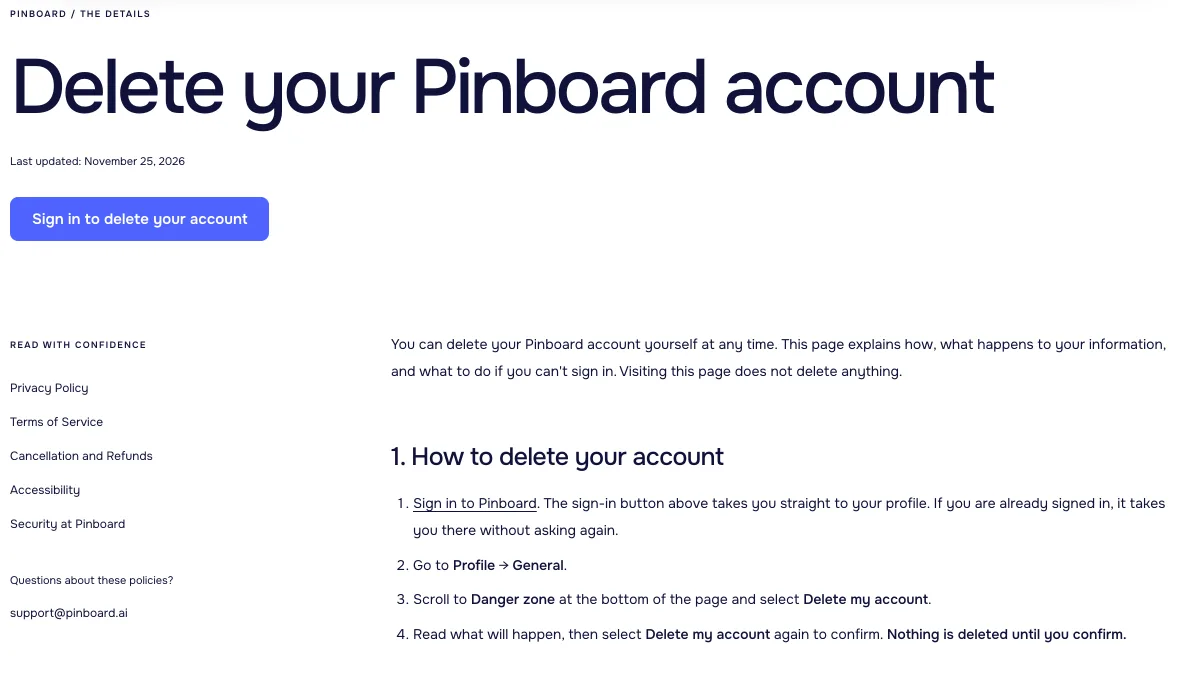
A public page shows how to delete your account, what is removed, what is kept and for how long, and what to do if you cannot sign in. Nothing is deleted until you confirm inside Pinboard, and you have 30 days to change your mind.
pinboard.ai/delete-accountChoose Sign in to delete your account to go straight to Profile, then General, then Danger zone.
Every change
Android app
9What to expect
The Android app is being released through Google Play and needs Android 8.0 or later. Calls ring full screen, and answering on a locked phone asks you to unlock it first.
- NewA tab bar along the bottom gives one-tap access to Home, Projects, Chat, Search and More.
- NewPress and hold the app icon for shortcuts to Search, Chat and Projects.
- NewAn incoming call rings like a phone call, full screen, with Answer and Decline.
- NewNotifications say which account they are for, and the app icon shows your unread count.
- NewSigned in to more than one account? Notifications and calls arrive for all of them, and tapping one or answering a call switches to its account.
- NewWhen you are signed in to more than one account, an incoming call shows the called account's email under the caller's name.
- NewLinks to pinboard.ai open in the app, and passkeys work in it.
- NewThe microphone, camera and file downloads work inside the app.
- NewA You're offline screen retries by itself when your connection returns.
iPhone app
5What to expect
Calls reach every account you are signed in to on the phone. Each account starts ringing the next time you open the app.
- FixedCalls ring for every account you are signed in to on your iPhone, not only the last one you opened. Answering switches to the account the call is for, and Decline declines as that account.
- ImprovedOpening the app turns on notifications for every signed-in account at once, so you no longer have to open each account first.
- NewWhen you are signed in to more than one account, an incoming call shows which account is being called, after the caller's name.
- ImprovedThe number on the app icon counts unread across every account you are signed in to, not just the one you have open.
- FixedTapping a notification for another account, or answering its call, now opens what it is about instead of your home page.
Calls
1What to expect
Anything that opens on its own waits until your call is over.
- FixedWhat's New no longer opens over a call you just answered. It waits until the call is over.
Account
4What to expect
Deleting an account starts a 30-day grace period during which you can cancel. Content you made in a shared workspace stays with the workspace and no longer shows your name.
- NewA public page at pinboard.ai/delete-account explains how to delete your account and what happens to your information.
- ImprovedThe Privacy Policy's words about deleting your account now link to that page.
- FixedThe label above the heading on the policy pages no longer hides behind the top menu.
- ImprovedNew accounts are open to people in the United States during early access, unless they arrive with an invite link. The sign-up screen says so and keeps invite links working.
Sheets
8What to expect
A sheet's pages sit in a tab strip along the bottom, like a spreadsheet. Double-click a view tab to rename it.
- NewA sheet's pages show as tabs along the bottom, Excel style.
- NewDouble-click a view tab to rename it in place.
- FixedCmd or Ctrl+F always opens the sheet's own search, never the browser's.
- FixedSearch next and previous move to the match, and a saved search scrolls to its match when the sheet opens.
- FixedColumns scrolled under a frozen column no longer show through it.
- FixedThe avatar that shows someone is editing a cell now sits cleanly on the cell, including in the first row.
- FixedDuplicating a row works again.
- ImprovedNumbers read as numbers, and rollups no longer use italics.
Boards
8What to expect
Opening and scrolling a board is quicker, and the item panel is more consistent.
- ImprovedOpening a board loads its data at once, and a board that has not changed answers faster.
- ImprovedScrolling a long board is smoother.
- ImprovedA new board puts Description last in the item panel, and Activity sits at the bottom of the panel's side rail.
- ImprovedThe item panel's Details rows share one size, height and edge.
- ImprovedGroup names pin while you scroll, and group corners are tighter.
- FixedSub-item numbers stay put, and guide lines join from row to row when titles wrap.
- FixedA clicked row keeps its number, and an unread row is marked by its blue edge alone.
- FixedArchiving many items at once no longer overloads the app.
Service Desk
7What to expect
Ticket events such as reopening, reassigning and merging show as one quiet line in the conversation. Those lines are internal and are never sent to the person who asked for help.
- NewTicket and chat events draw as one quiet line, and reopening, reassigning and merging a ticket now leave a line in the ticket's history.
- FixedInternal event lines never appear in emails to the requester and cannot be created by hand.
- FixedThe note you write in the Resolve dialog is saved on the ticket, in its Messages thread.
- FixedChoosing "archive the resolved tickets" in the assistant archives them instead of only filtering the list.
- ImprovedAssignment groups have a new look, and their settings page scrolls once.
- ImprovedThe ticket list numbers its rows like a board, and the reply bar's divider spans the whole ticket pane.
- FixedMarking many tickets as read no longer overloads the app.
Chat
4What to expect
Files you send in direct and group messages count against your own 300 MB of private chat storage, not the workspace's. Deleting a message deletes only files its author uploaded.
- NewSend video in chat.
- NewFiles you send in direct and group messages are stored for you, up to 300 MB, and you can see and clear them under Profile, Chat storage.
- FixedDeleting a message deletes only the files its author uploaded.
- FixedOn iPhone, tapping the chat box no longer slides the whole app up under the status bar.
Notes
2What to expect
Tags you add to a note are kept. Who can edit a note comes from how it is shared: Can view or Can edit for each person.
- FixedA note's tags are saved and show again when you reopen it.
- ImprovedThe note "who can edit" control is gone, because it never saved anything.
Time tracking
1What to expect
Edits to time entries save exactly what you entered.
- FixedTime entry requests use the right field names, so edits are saved as you entered them.
Workspace
5What to expect
Role order, project dates and admin access now behave the same everywhere you reach them.
- FixedReordering roles saves the new order.
- FixedA workspace Owner or Admin acts as a project Admin everywhere.
- FixedSaving a project's start or end date from its settings page no longer fails.
- FixedThe Projects overview scrolls once, as a page.
- ImprovedA bug button in the top bar opens the report-a-bug panel.
Ask
3What to expect
Reopening an earlier conversation keeps it as one thread.
- ImprovedAsk's scope picker is one list: your workspaces, then every project.
- FixedA reopened conversation continues where it was asked instead of starting a new one.
- FixedA thumbs-down's Send to support files a support ticket, and a reopened chat keeps its thumbs.
iPhone app
1What to expect
Dictation is recognized on the phone itself, so your voice is not sent anywhere to be turned into text.
- NewDictate into the chat box for free, recognized on your iPhone.
Security
3What to expect
These steps protect accounts that already use a passkey or an authenticator app. You will be asked to prove it is you before changing a sign-in method.
- ImprovedAdding or removing a passkey, or replacing an authenticator app, needs a fresh proof that it is you.
- NewYou get an email whenever a sign-in method on your account changes.
- ImprovedSite administrators can confirm a sensitive step with a passkey, not only a code.