

94 changes
Collections, rewards for your agents, and an easier phone
Save boards and notes from any project as tabs in a collection, unlock accessories for your agents, and get around Pinboard more easily on your phone. Storage counts are more accurate, and team chat points you to the AI chat for talking to AI.
- 41 new
- 37 improved
- 16 fixed
On this page31 sections
Highlights
01Collections
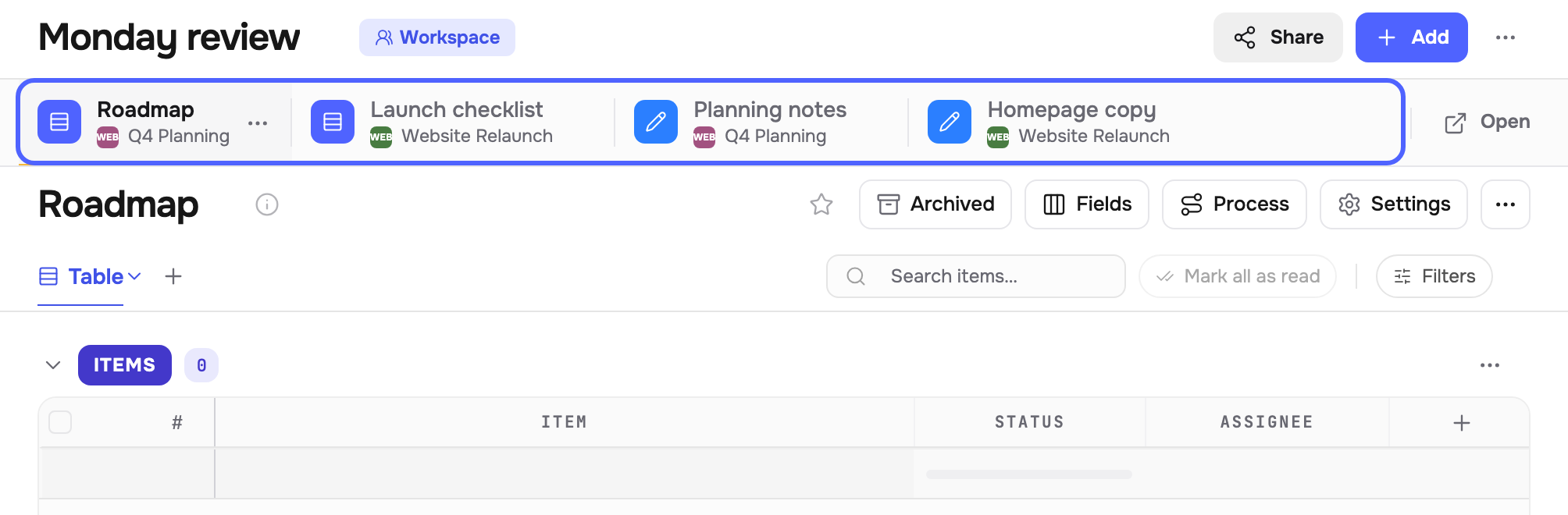
Collections: your boards and notes, one tab apart
Save the boards and notes you open together, from any project, as tabs you switch between.
Projects → CollectionsChoose New collection, then add boards and notes to make your tabs.
02Agent rewards
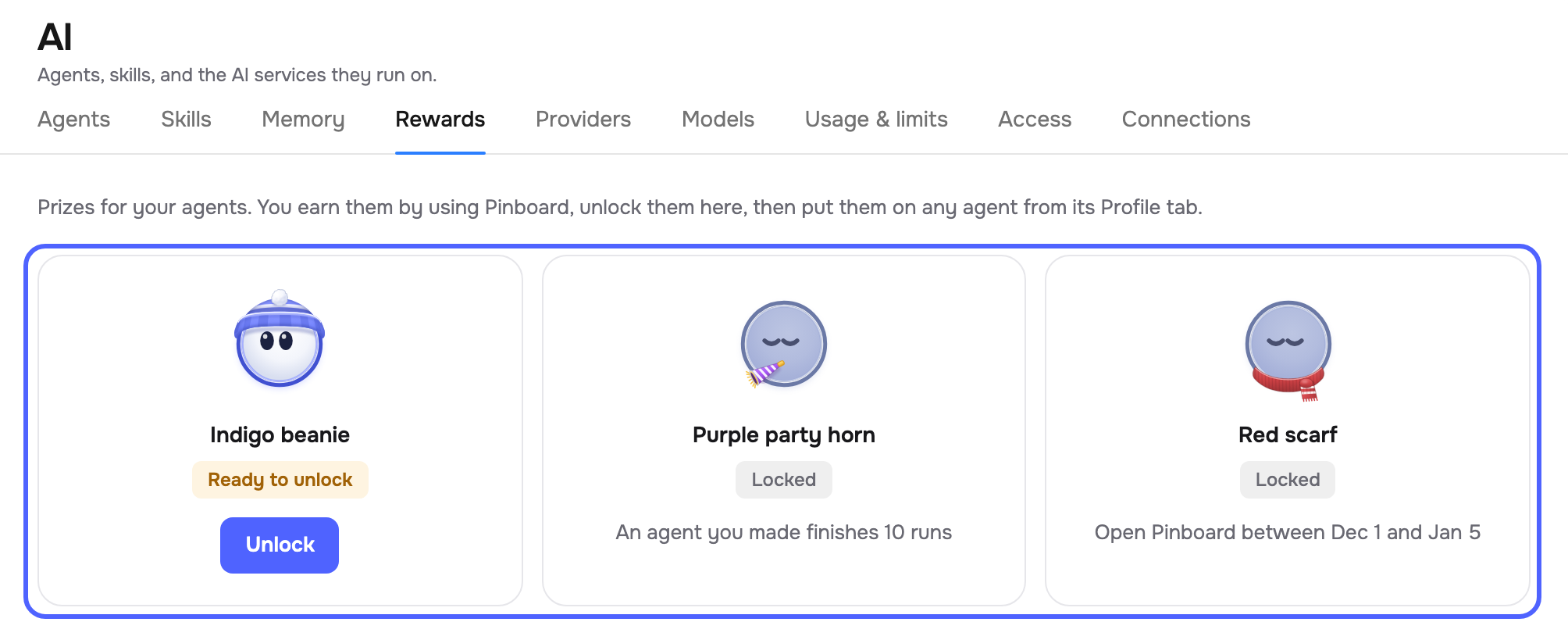
Rewards for your agents
Unlock accessories for your agents by using Pinboard, from holidays to agent milestones.
Workspace → Settings → AI → RewardsChoose Unlock on an earned item; locked ones say how to earn them.
03Phone navigation
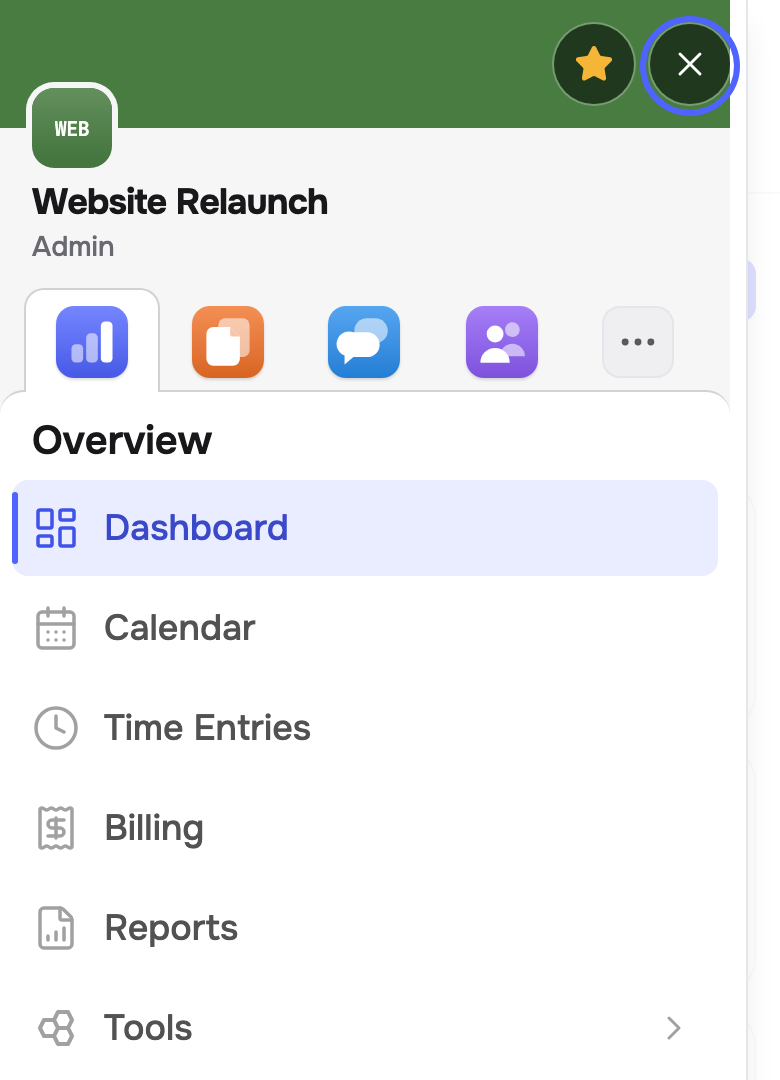
Easier navigation on your phone
Menus close with the X or a swipe, and the rows and tabs are bigger and easier to tap.
Any project on your phone → menu buttonTap the X at the top of the menu, or swipe it away, to close it.
Every change
Collections
6- NewCollections: save boards and notes from any project as tabs you switch between.
- NewA New collection and Add to collection dialog, on phone and desktop, with search, type filters, a project list, Recent, folder browsing and Add all.
- NewDrag the tabs to put them in the order you want.
- NewChoose who can open a collection: everyone in the workspace, specific people, or only you.
- NewMy collections, in your personal area, shows your collections across all your workspaces.
- NewEach tab has its own menu, and you rename a collection by clicking its name.
Agent rewards
4- NewA Rewards tab on the AI page, where you unlock accessories for your agents.
- NewItems are earned through holidays and agent milestones, such as a first run, 10 runs, a winter window and an agent's anniversary.
- NewLocked items show how to earn them; unlocked items can be put on an agent in its Accessories.
- NewFour accessories to start with: a beanie, a party horn, a scarf and a paper crown.
Navigation
3- ImprovedChat, Calendar and Time each have their own icon on the left rail again, with their own counts.
- ImprovedChat shows your conversations in their own column, and Time has its own sidebar again.
- ImprovedHome's sidebar keeps your own pages: Overview, My Pinboard, My collections and My to-dos.
Dashboards
5- NewBuild a dashboard across several projects, not just one.
- NewClick a chart or number to open the items behind it.
- NewFilter a dashboard, compare against an earlier period, set a goal line, or split a chart by a field.
- NewSubscribe yourself to a dashboard by email on a schedule you choose.
- ImprovedDashboards sit on the gray page, and cards lose their outlines for a calmer look.
Collections sharing
5- NewShare a collection with specific people, or give the whole workspace general access, as viewers or editors.
- NewProject collections: keep a collection inside one project as its own kind of page.
- ImprovedThe collection header is calmer, with tabs on an underline and no visibility badge.
- ImprovedTabs you can't open are hidden, and Add is a blank tab you fill in.
- FixedMy collections says so when it couldn't load, instead of looking empty.
Sheets
5- NewImport an Excel workbook as a folder of sheets, one per tab.
- NewEach sheet in a folder has its own name, and a sheet and its note share that name.
- NewType {Name} in a formula to point at the sheet with that name in the same folder; formulas follow along when that sheet is added, removed, copied or renamed.
- NewA column can opt out of totaling into its parent rows; Excel imports use this where it makes sense.
- FixedFill colors show in both light and dark themes, in the picker and on the cells, and a new fill appears right away.
Team chat
8- NewSet a status message, and see when someone is Away or when they were last seen.
- NewSave messages to come back to later.
- NewPick from a searchable emoji picker in the message box and for reactions.
- NewA More menu on each message to copy its link, forward it, or mark it unread from there.
- NewLinks in messages show a preview underneath.
- NewJump to your first unread message when you open a conversation.
- ImprovedA message that fails to send stays put so you can retry, and retrying never posts it twice.
- ImprovedA chat list that couldn't load says so, and its search and buttons are one height and finger-sized on phones.
Scheduled calls
4- NewAdd a Pinboard call to a calendar event, with a Join button for attendees.
- NewShare a guest link so people outside your workspace can ask to join; they wait on a waiting-for-host page until you admit them.
- NewHosts can admit, block or remove guests from the call.
- ImprovedThe call's chat follows the event's attendee list.
Calendar
4- NewCalendar invites arrive with a calendar file attached, so they add to any calendar app.
- NewA subscribe link shows your Pinboard events in another calendar app.
- ImprovedMy calendar looks like the rest of Pinboard, and Up next no longer says you're caught up when it couldn't load.
- FixedAttendee lists are private to the people invited.
Notifications
4- NewGet push notifications in your browser, and a count on the iPhone app icon.
- ImprovedClicking a notification in the desktop app opens the right page.
- ImprovedCalls ring out loud in the Mac app, and signing out clears the dock count.
- ImprovedThe iPhone icon count stays accurate while the app is open.
Meetings AI
2- ImprovedLive meeting notes and prompts run on your workspace's own AI key.
- FixedWhat was said in a meeting is no longer kept in logs.
Account and accounts menu
4- NewYour accounts show as cards in the avatar menu, and one click switches between them.
- ImprovedWorkspace and Site admin moved to the top bar on desktop, and Arcade is in the avatar menu.
- ImprovedNavigation icons are a single tone, and top-bar links match the buttons.
- ImprovedThe account drawer on phones has finger-sized rows.
Home
4- NewYour home timeline has tabs and loads in pages.
- ImprovedEvery Overview card starts with the same header.
- ImprovedCount tiles open My Pinboard with the matching filter.
- FixedOverview no longer says all clear when it couldn't load.
My Pinboard
4- ImprovedMy Pinboard shows its title on desktop, with the toolbar on its own row.
- ImprovedFilters open in a sheet on phones, and long lists load faster.
- ImprovedSpaces show the project's avatar next to its name.
- FixedA failed load no longer says Nothing is assigned to you.
Projects sidebar
4- NewDelete a folder from the rail.
- NewDrag a project out of a folder onto the rail.
- ImprovedJoin project is a quiet card in the project sidebar.
- FixedA folder in the project sidebar folds in place instead of opening its page.
Canvas
3- NewShapes and arrows that pop, and swap one shape for another without redrawing.
- NewSeveral flows on one canvas, with a run bar and a glowing Play run that lights the diagram.
- NewA Flow view board setting and a Loops back tag on arrows that return.
Board header
1- ImprovedThe board header is quieter: stats sit under the title and setup options live in one Setup menu.
Loading
1- ImprovedOne branded loading screen appears everywhere in place of spinners and blank placeholders.
Time and to-dos
4- FixedTime shows the right weekdays, stops making up numbers, and says when a week couldn't load.
- FixedToday on the Time dashboard fits its hours on phones.
- FixedMy to-dos and the Time off panel say when they couldn't load.
- ImprovedThe Time sidebar and My to-dos use Pinboard's standard controls.
Settings
2- FixedSecurity no longer shows Unable to load password status.
- FixedGeneral has no boxes inside cards, and Remove stays on screen on phones.
Terms
2- ImprovedEvery account must accept the 2026-11-09 Terms to keep using Pinboard.
- NewBeta notices appear where features are still early.
- NewMail from Pinboard shows our logo as the sender picture in supporting mail apps.
Phone navigation
3- ImprovedMenus close with the X or a swipe.
- ImprovedPages outside a project open the Home column.
- ImprovedApp tabs are bigger and easier to tap.
Content
1- ImprovedCreate new opens a window of cards for each type, with templates one click away.
Team chat
1- ImprovedYou can no longer start a direct message with an AI bot; talk to AI in the AI chat instead.
Plans and storage
4- ImprovedBusiness storage grows with your team.
- ImprovedThe pricing page is simpler.
- FixedStorage counts are more accurate: skill files, files that aren't in a project, and uploads happening at the same time are now counted.
- FixedWhen you run out of storage, the message now tells you to empty the trash.
Boards
1- ImprovedChanges you make to a board's view, such as which columns show, now stay in your own view instead of changing it for everyone; people who manage the board can save them for everyone or reset.
AI chat
2- FixedDelete chat removes the chat at once.
- ImprovedThe AI panel is plain white.
Look and feel
1- ImprovedButtons, badges, chips, toolbar pills and segmented controls use fills instead of outlines, for a cleaner look.
Security
1- FixedContent written by others, such as tickets, emails, chat, help articles and comments, can no longer restyle the page or cover the app.