

58 changes
Forms, a map of how work moves, and the wiki inside Content
Build forms and quizzes people fill in, with every response kept as it was sent. Draw how work moves across a board, add approvals, and hand a stage to another service. The wiki now lives in Content, the Home column keeps your own pages close, and bots get their own faces.
- 29 new
- 16 improved
- 13 fixed
On this page14 sections
Highlights
01Content
Forms and quizzes, with responses that stand as a record
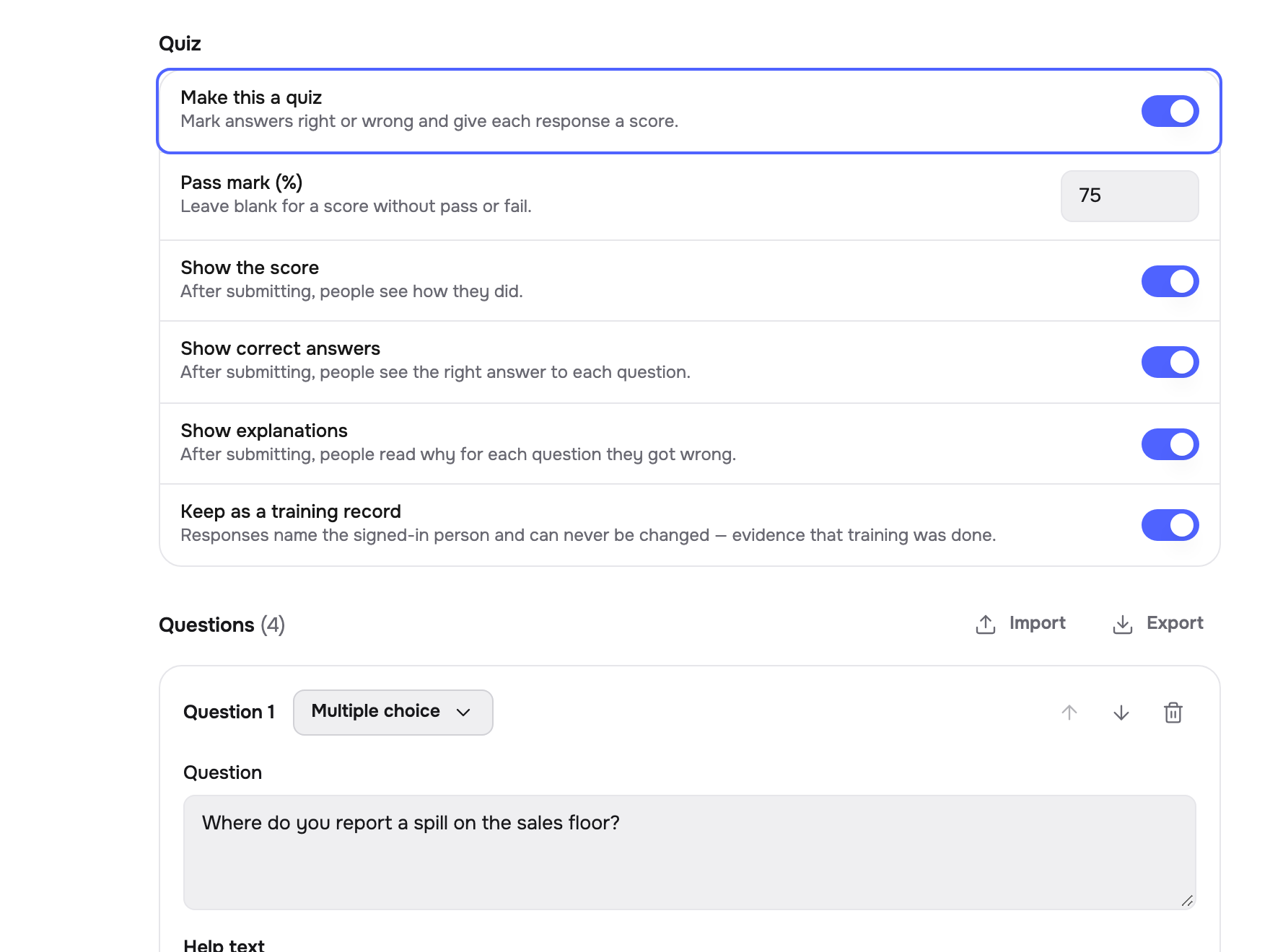
Build a form people fill in, turn on quiz mode to score it, and keep each response exactly as it was sent, so a finished quiz doubles as a training record.
Projects → open a project → Content → New → FormIn the form's Edit tab, switch on Make this a quiz to set a pass mark and what people see afterwards.
02Boards
A map of how work moves
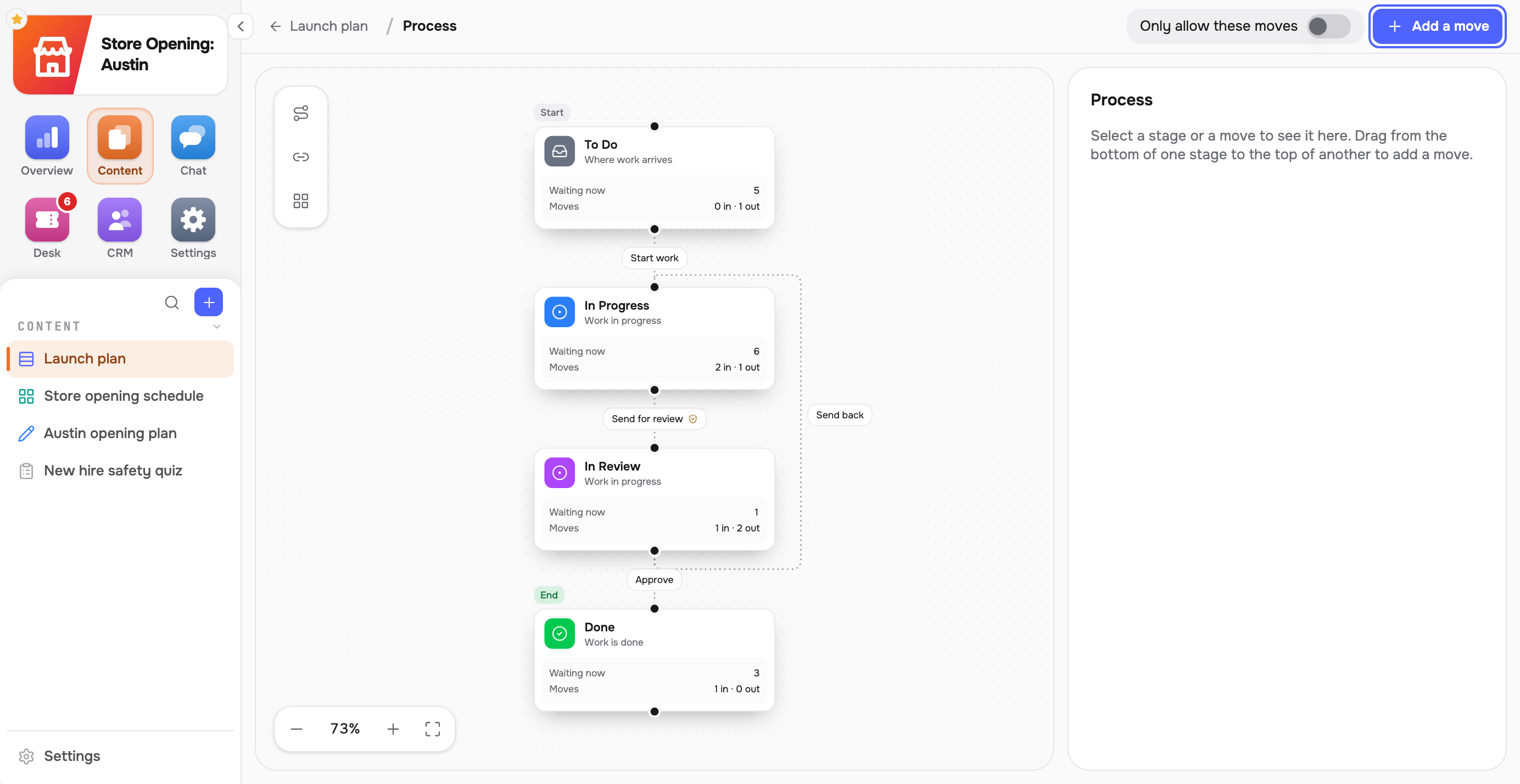
See a board's stages and the moves between them in one picture, name who may make each move, and ask for approval before a move goes through.
Projects → open a board → ProcessChoose Add a move, or drag from the bottom of one stage to the top of another.
03Home
Your own pages in the Home column
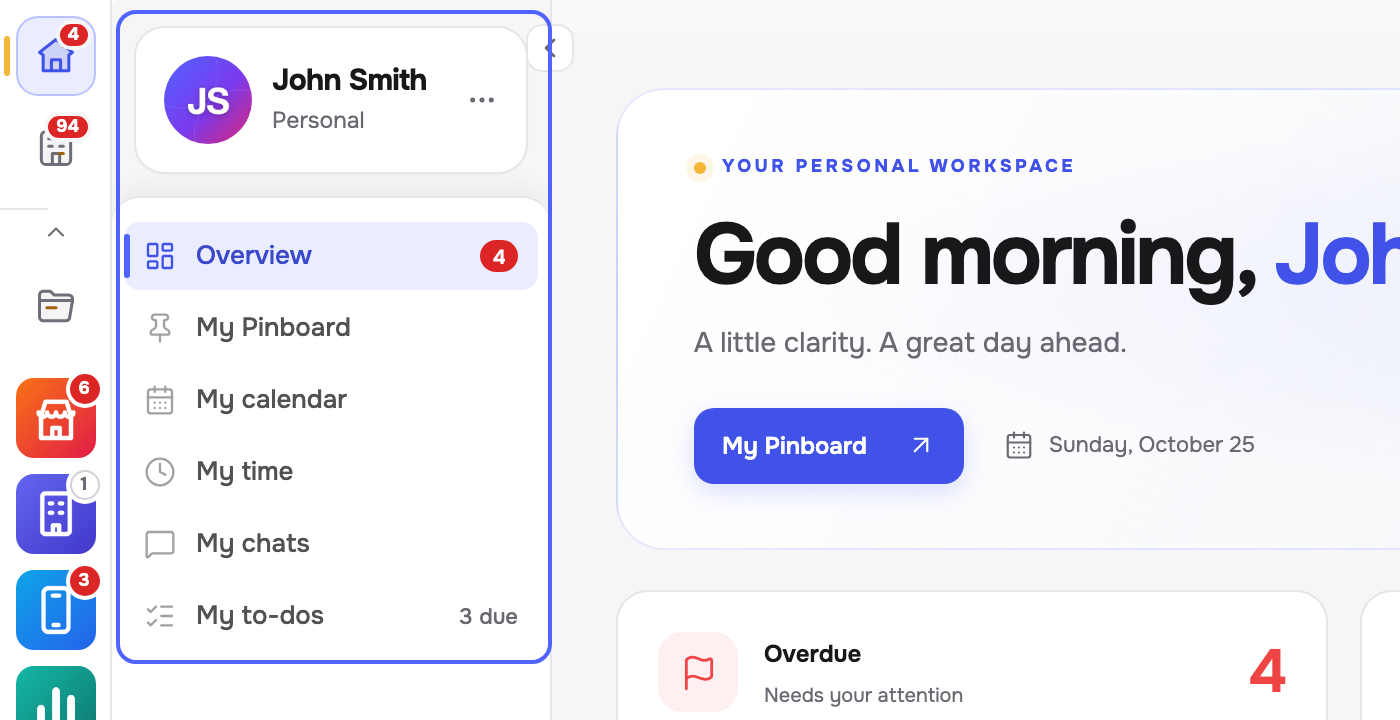
My chats, My time, My calendar and your to-dos sit together in one column, a click away from anywhere in the app.
Home, at the top of the left railChoose Home in the rail to open the column, then pick any of your pages.
Every change
Content
12- NewForms: build a form people fill in, publish it, and review every response in one place.
- NewTurn on quiz mode to mark answers, add an explanation for each question, and keep every attempt.
- NewChoose whether people see their score and the right answers once they finish.
- NewLock a form, a note or a sketch so nobody changes it by accident.
- ImprovedThe wiki is part of Content: your pages are in a Wiki folder, and links and bookmarks to them still work.
- NewMark any note as the wiki and it shows a green badge, so search and the AI treat it as the official answer.
- NewType [[ to link to another note or a board item, and see what links back from either side.
- NewShare a note with everyone who has a role in the project.
- NewZoom a notepad page, with margins that fit the column.
- FixedTyping --- makes a divider again, and pasting text no longer traps you in a code block.
- FixedCo-editors see each other again, and a note that stays open for a while stays live.
- FixedAn archived project's notes and sketches open read-only.
Boards
6- NewThe Process map shows a board's stages and the moves between them, and you can arrange it by dragging.
- NewName the moves an item may make between stages, and who may make each one.
- NewA move can ask for approval first, and an automation can wait for an approval before it carries on.
- NewConnect a stage to any service at a web address: items sent there come back, with its comments, when the work is done.
- ImprovedA field you add from a view's plus button only appears in that view.
- FixedMoving a card between kanban lanes lands where you drop it, and sub-item cards name their parent.
Approvals
3- NewAn approvals inbox lists what's waiting for you, and you decide in a dialog with a comment.
- NewYou're notified when something needs your approval and when your request is decided.
- NewSet up approval workflows for Service Desk, and edit them again later.
Home
6- NewA Home column keeps your own pages together: My chats, My time, My calendar and To-dos. Pin any of them to the rail.
- ImprovedOverdue, Due today and This week count your board items, and the Brief reads your board work.
- NewAsk the assistant what's at risk across all your projects, and see the answer by project.
- ImprovedSearch opens in a window again, full screen on a phone, and finds what you meant faster.
- ImprovedPages load with far fewer requests, so moving around the app is quicker.
- FixedThe project health table scrolls sideways on a phone instead of being cut off.
Service Desk
6- NewAdd to board turns a ticket into linked board work.
- NewDraft with AI writes a reply from your knowledge base for you to check and send.
- ImprovedSLA due times show on tickets and respect business hours, and a reply to the requester stops the response clock.
- ImprovedLive chat hands off to a person when the bot can't answer, and keeps working in a second tab.
- FixedTicket emails show their screenshots and the project logo instead of blank boxes.
- FixedThe SLA policies page shows each target instead of Not set.
CRM
2- NewLog calls, emails and notes on an opportunity.
- FixedThe workspace deal board shows deals from every pipeline.
Bots
3- NewEvery bot has its own face and color, in chat, comments, mentions and the bot market.
- NewA bot that runs on your own AI plan shows how much of its limits are used and when they reset.
- ImprovedNew bots start in live mode.
Chat
3- FixedLinks in messages are clickable.
- NewReport or block someone from a message on a phone or tablet.
- FixedA chat window never shows up blank when newer messages are waiting.
To-dos
2- NewAsk for a reminder at an exact time, like 3pm, on the web, your phone or by voice.
- NewA morning notification lists what's due today, tomorrow or overdue.
Time
2- ImprovedSuggested timesheet entries include your board work and comments, follow your day and skip time you've already logged.
- FixedThe timesheet page opens instead of showing a blank screen.
Account
4- ImprovedChoose an authenticator app or a passkey for two-step sign-in; both are offered equally.
- NewUse a passkey to confirm a project transfer code.
- NewAn API token's owner gets an email when the token keeps hitting its rate limit.
- ImprovedWorkspace admins can favorite any project, and others see why they can't.
Arcade
6- NewSeek is a new daily word search: find every word on today's topic in the grid.
- NewLookout is a new daily hidden-object game: find Pip and everything on the list in a busy town, a beach or a snowy village, drawn fresh each day.
- ImprovedSolving a puzzle shows a ticket with your time, and every game has a rebuilt results page.
- ImprovedPlay takes you straight to the puzzle, with no second start screen.
- ImprovedIn Mosaic, pick Fill or Cross off, then tap a tile to add or remove that mark.
- FixedQuick taps in Alibi always land on the right square, including on iPhone.
iPhone app
3- ImprovedThe app asks before sending anything to an AI service.
- FixedThe app stays clear of the screen edges when your phone is on its side.
- ImprovedThe Search tab opens search straight away and remembers your recent searches.