

9 changes
Private meetings stay private, and notifications take you where they should
A meeting you mark private is now yours alone everywhere it appears, files can only be moved within their own project, and tapping a notification opens the page it is about.
- 2 improved
- 7 fixed
On this page6 sections
Highlights
01Meetings
Private meetings are yours alone
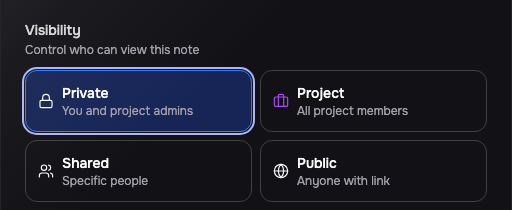
Mark a meeting Private and it stays yours: other members won't find it in their meeting list, in search, or in the assistant's answers.
Content → open a meeting → Sharing and permissions (top right)Select Private under Visibility, then Save Changes.
Every change
Meetings
3What to expect
A private meeting is visible only to the person who created it. Other members, including admins, don't see it in the meeting list, search, the assistant's answers or the Content tree. Meetings shared with the project work as before.
- FixedA private meeting no longer shows up in other members' meeting lists, with its summary and action items.
- FixedRecaps, transcripts, attendees and pinned items of a private meeting stay with the person who created it, and the assistant can't read them for anyone else.
- FixedA private meeting's note in Content is private too, and stays in step when you change the meeting's visibility.
Files and notes
1What to expect
You can move a file or note to any folder in its project, or to the project's top level. Moving it into another project's folder is refused.
- FixedMoving a file or note only lands it in a folder of the same project, so nothing can vanish into a folder you can't reach.
Notifications
2What to expect
Clicking a notification in the bell, or tapping one on your phone, opens the board, ticket, note or chat it is about. Links that would leave Pinboard are ignored.
- FixedEvery notification, and tapping a notification on your phone, opens the page it is about.
- FixedUnread counts agree everywhere you see them.
Mobile
2What to expect
On a phone, the bar along the bottom holds your main destinations and More opens the rest in a sheet.
- ImprovedThe phone app bar is tidier, and the More sheet slides out from behind it.
- FixedFavorite project tiles are centered on a phone.
Arcade
1What to expect
Each game page leads with the Play button; the rules are just below it.
- ImprovedPlay now sits above How to play on game pages.