

45 changes
Views that keep their own columns, a clearer Fields dialog, and a timeline that plans with you
Each board view now chooses its own columns, and the Fields dialog is rebuilt so a board's fields are easy to find and set up. The timeline nests sub-items, splits into lanes and links blocked work. Drag columns and view tabs into place, shift-click to select rows, see deals from every project on one board, and hand ticket work to bots on a schedule.
- 17 new
- 17 improved
- 11 fixed
On this page7 sections
Highlights
01Boards
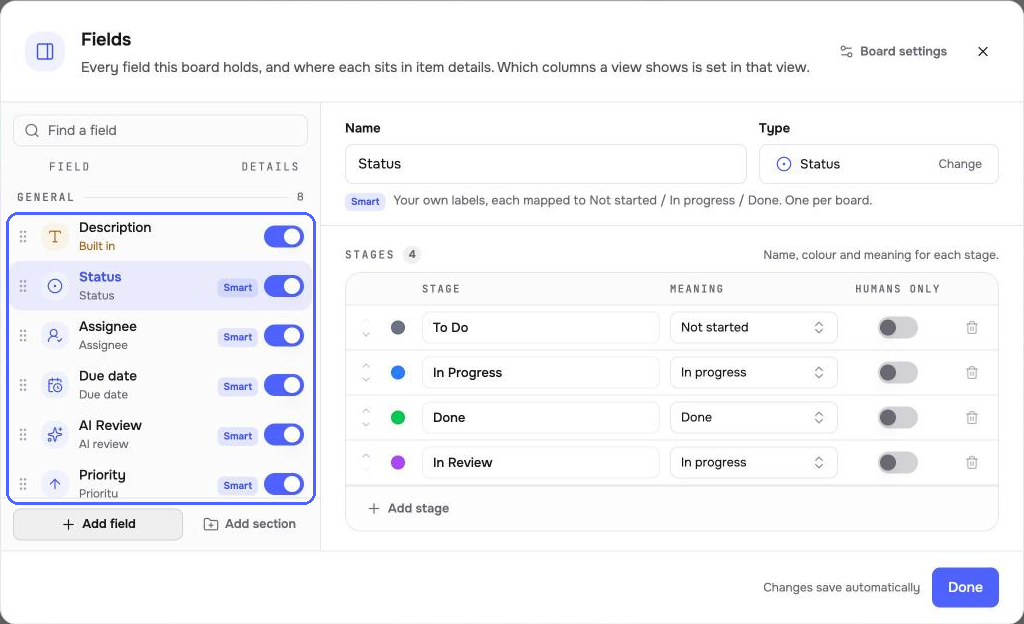
A Fields dialog you can find your way around
Every field the board holds sits in one list you can search and drag into order, with its settings beside it. Fields that power board features, like status and dates, are marked Smart.
Projects → open a board → FieldsChoose Fields in the board's top bar, then pick a field in the list to change it.
02Boards
Each view keeps its own columns
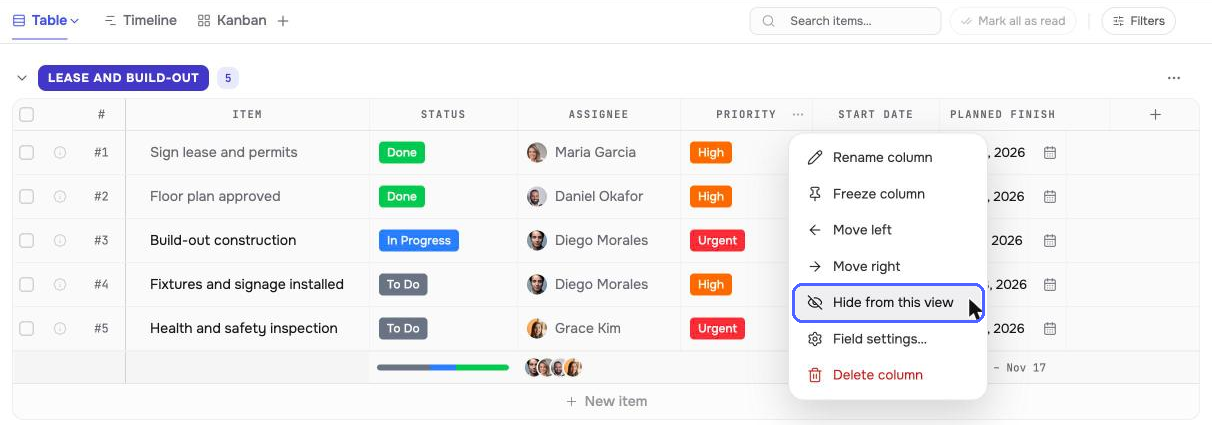
Hide a column from one table and every other view stays as it was. Add columns back with the plus, and drag a column header to move it.
Projects → open a board → TableOpen a column's menu and choose Hide from this view, or use the plus at the end of the header row.
Every change
Boards
21- NewEach table, kanban and timeline view keeps its own columns: hide one from a view, or bring it back with the plus.
- NewDrag a column header to move it, in tables and in the timeline's side columns.
- NewDrag view tabs to put them in the order you like.
- NewHold Shift and click rows to select everything between them.
- NewChoose which fields show on kanban cards with Card fields.
- ImprovedThe Fields dialog is rebuilt: a searchable list of every field on the left and its settings on the right.
- ImprovedFields that power board features, such as status, dates and assignee, are marked Smart, with a note on what each one does.
- ImprovedDescription can be moved like any other field and shows where you put it in an item's details.
- ImprovedStages are set up in one table: name, color, meaning and whether only a person may set them.
- Improved"People only" stages are now called "Humans only".
- ImprovedArchived moved to the board's top bar and Export CSV to each view's menu.
- ImprovedA new timeline starts with just the item column; add more with the plus.
- ImprovedAdd group sits at the bottom of the board, after the last group.
- NewThe timeline nests sub-items under their parent, and splits its rows into lanes and swimlanes like the kanban view.
- NewOn the timeline, drag from the end of a bar onto another item to say it blocks that one.
- NewWhen a change leaves blocked work starting too early, the timeline offers to move it to after its blocker.
- ImprovedStart date and Due date now make a timeline bar, the way most planning tools pair them. End date is retired.
- ImprovedThe timeline's week view shows every date.
- FixedKanban cards show an item's description as plain text instead of formatting code.
- FixedIn the kanban view, the Unassigned swimlane comes last.
- FixedScreenshots from the customer portal show in an item's details instead of a broken image.
CRM
2- NewThe workspace Opportunities page has a Board view across all your projects, with each card showing its project.
- FixedDeals in archived projects no longer offer edit, drag or New deal, which always failed.
Bots
12- NewAutomations can run a bot on each ticket that matches a filter, with a ready-made Daily ticket review recipe.
- NewSchedules in Automations run in the time zone you choose.
- NewA rule's run history shows a short summary of what each step did.
- NewCreate a named, shared Pinboard AI bot from Settings, Chat Bots.
- NewHand a ticket to a bot, or mention one, from the full ticket page.
- NewWorkspace admins can turn bots on people's own computers on or off for the whole workspace.
- NewA bot's owner can narrow which skills it may use on their computer.
- ImprovedEvery recipe's prompt picker offers to create the suggested prompt for you.
- ImprovedBot summaries and comments show formatted text, and a run links to who reviewed it.
- ImprovedHanding an item to a bot warns you when that bot can't draft ticket replies.
- FixedTicket replies drafted by Pinboard AI wait in the Outbox for a person to approve.
- FixedAutomation steps show names instead of codes under their titles.
Service Desk
2- FixedInternal notes on an archived ticket are read-only.
- ImprovedTicket field settings match the new Fields dialog.
Account
4- FixedFollowing an invite link fills in the invited address on the sign-in page.
- FixedAn invite is kept through sign-in, accepting the terms and setting up your account.
- FixedA saved account that needs signing in again says so and stays in the account menu.
- FixedSign-in links that try to send you to another site are refused.
Arcade
4- ImprovedHints in Alibi and Pins say what to mark and why.
- ImprovedHeaders shrink while you play, and Pins hint marks are easier to see.
- ImprovedAlibi has a wider layout on a computer, and quick taps keep every mark.
- NewPins has a scoreboard.