

101 changes
Calls in chat, one Pinboard seat, and Bookings
Start a voice or video call from any chat and share your screen, a notepad or a canvas in it. Content, Wiki and project chat now come with one $12 Pinboard seat, Meetings is $19 for group video, and everyone in a paying workspace can view, message and call for free. Bookings plans people's weeks against what they logged, CRM works across projects, and big boards, sheets and canvases are much faster.
- 41 new
- 21 improved
- 39 fixed
On this page18 sections
Highlights
01Calls in Chat
Call from any chat
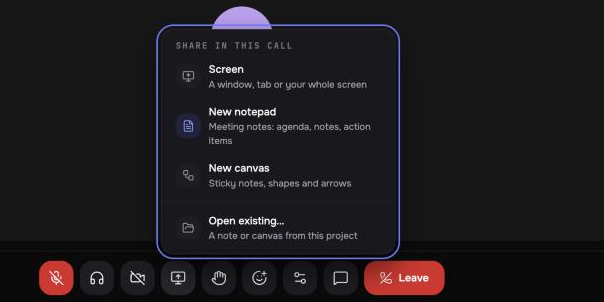
Start a voice or video huddle in a project chat room, or call someone from a direct message, and share your screen, a notepad or a canvas without leaving the chat.
Chat → open a chat room or direct messageChoose the phone button at the top of the chat, then Share in the call controls to show your screen, a notepad or a canvas.
02Bookings
Plan the week, then see what was logged
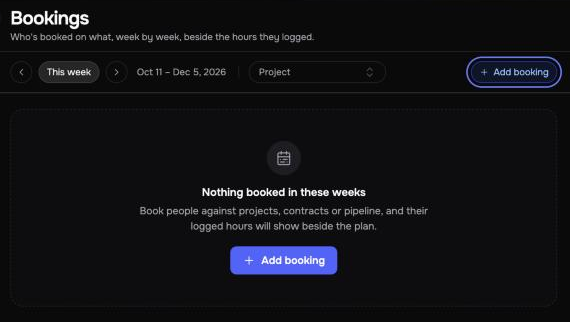
Bookings shows who is booked on which project, contract or deal each week, with the hours they actually logged beside the plan.
Workspaces → open a workspace → BookingsChoose Add booking to plan someone's hours over a run of weeks.
03Chat
Files and pinned messages in every chat
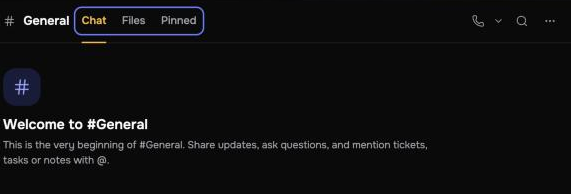
Each chat now has Files and Pinned tabs and its own search, so a shared file or an important message is one click away.
Chat → open any chatChoose Files or Pinned beside the chat's name, or the search icon to search just this chat.
Every change
Calls in Chat
12- NewStart a voice or video huddle in a project chat room, or call someone from a direct or group message.
- NewCalls in direct and group messages ring the other people, on the web and in the mobile app, and a missed call leaves a note in the chat.
- NewTurn on your camera, share your screen or a tab with its sound, and watch up to three screen shares side by side.
- NewShare a new notepad, a new canvas or one you already have into a call, and everyone in the call can edit it together.
- NewExpand a call to see everyone in a grid or the speaker large, with the chat beside it, or pop it out into its own small window.
- NewRaise your hand, send reactions, pin someone, change each person's volume, and check your camera and microphone before you join.
- NewHosts can ask someone to mute, turn off a camera or stop a share, mute someone for everyone, remove people, lock the call and choose who can share.
- NewWorkspace admins can choose who may start calls and how long call details are kept, and see this month's calls and group video use, under Settings → Calls.
- NewKeyboard shortcuts: ⌘D (Ctrl+D) mutes, ⌘⇧D deafens and ⌘E turns your camera on or off, and the desktop app can mute or push-to-talk from any app during a call.
- NewAn audio-only mode, noise suppression and push-to-talk are in call settings.
- ImprovedScreen readers announce when people join, leave or start speaking.
- FixedSomeone who leaves a chat or the workspace is taken out of its call and is no longer rung.
Billing
8- NewOne $12 Pinboard seat now covers Content, Wiki and project chat rooms.
- NewPinboard + Meetings is $19 and lets someone host group video calls and share their screen in them.
- NewCRM is now available to buy, at $15 per person.
- ImprovedAll apps is $39 for Pinboard, Service Desk and CRM together, and now includes Meetings.
- ImprovedApps & Billing, invites, new projects and sign-up show Pinboard, Meetings, Service Desk, CRM and AI as the seats you can give someone.
- FixedAn invite for Pinboard, Service Desk and CRM now includes Meetings when it's accepted.
- FixedDropping Service Desk or CRM from someone on All apps no longer leaves them paying for Meetings nobody chose.
- ImprovedWhen you cancel from Manage billing, Pinboard asks one optional question about why, so we can fix what isn't working.
Workspaces
6- NewEveryone in a paying workspace can view what's shared with them for free, read-only.
- NewDirect messages, group messages, voice calls and one-to-one video are free for everyone in your workspace.
- ImprovedView-only members get read-only wiki pages, notes and boards, with no edit buttons that would fail.
- ImprovedContent, Wiki and Chat can still be switched on and off for each project, and all three use the same Pinboard seat.
- FixedSomeone whose only other project is in the trash leaves the workspace, and stops being billed, when they leave their last project.
- FixedThe Leave dialog no longer says you'll be removed from 0 projects.
Chat
13- NewEach chat has Chat, Files and Pinned tabs: every image and file shared in it, and the messages people pinned.
- NewPin a message from its hover toolbar, and search inside a single chat.
- NewStar chats into Favorites at the top of My chats; everything else sits in one list, newest first, with the last message under each name.
- NewMessage your workspace's AI bots from My chats, just like teammates.
- ImprovedMessages are full-width rows with counted reaction chips, a hover toolbar, a welcome at the top of each chat and a roomier message box.
- ImprovedThe chat's buttons for members, bots, games, rename and leave are in one ⋯ menu, with favorite and mute.
- FixedChat search shows each chat or person once, before message matches.
- FixedA chat row's menu opens beside it instead of in the corner of the page.
- FixedA chat's name is no longer cut short on phones.
- ImprovedOn phones, your messages sit on the right in blue bubbles and everyone else's on the left with their photo.
- FixedYou no longer get a notification or a chime for a chat you have open on screen.
- FixedYour own status dot shows you as online (or Busy) instead of offline.
- FixedPeople's profile photos show in every chat list, the chat dock and the mini chat window, not only in the chat you have selected.
Bookings
4- NewA workspace Bookings page plans each person's hours per week against a project, a contract or a CRM deal.
- NewEach week shows planned and actual hours side by side, with each person's total against their capacity and how much of each contract is used.
- NewManagers change planned hours right in the grid, add a booking over a run of weeks, and remove a line.
- NewAI tools connected to Pinboard can list and set bookings.
CRM
5- NewA workspace CRM shows the pipeline, deals and forecast across all of its projects, with filters for project, owner, stage and close date.
- NewMembers without a CRM seat can read the CRM in their projects, with a View only banner.
- NewAsk for a CRM seat from the View only banner; admins approve it from the seat request queue and you hear back either way.
- FixedOpportunity board columns grow to fit all their cards.
- FixedMoving a deal on a workspace board stays put instead of snapping back.
Reports
6- NewShow a report as Rows, Summary or Pivot.
- NewPivot a report into a table with row and column totals, and click any number to see the rows behind it.
- NewCollapse and expand groups one at a time, or all at once.
- ImprovedA sheet's Report button makes a report from the view you're looking at and saves it beside the sheet.
- ImprovedDurations in grand totals show as hours.
- NewAI tools connected to Pinboard can create, change and run reports.
Boards
5- ImprovedLarge boards open much faster: a 1,000-item board opens in under 3 seconds instead of about 20.
- ImprovedEditing, sorting and searching big boards responds right away, in table, kanban, timeline and calendar views.
- FixedRight-clicking a row opens its menu again.
- FixedOpening an item on a phone no longer brings up the keyboard.
- FixedTabbing past a row's drag handle no longer traps the keyboard on the first row.
Sheets
6- ImprovedSorting, filtering and searching big sheets is near instant.
- ImprovedClearing a huge selection takes seconds instead of minutes.
- ImprovedSheets with many formulas recalculate much faster.
- FixedA formula that can't be read shows #SYNTAX! in its own cell, and formulas that refer to each other show #CYCLE!, instead of breaking the sheet.
- FixedMulti-select columns sort by their labels, and formula columns with numbers sort as numbers.
- FixedROUNDUP and ROUNDDOWN with a huge number of digits no longer freeze the sheet.
Canvas
6- ImprovedBig canvases draw much faster: panning, zooming and dragging stay smooth on boards with thousands of shapes.
- NewMake a shape a switch that follows one branch, flip it from the pill on its edge, and press Play to watch the route light up.
- NewThe AI can turn shapes into switches and choose their active branch.
- NewArrows connect to text as well as shapes.
- ImprovedGrabbing the end of an arrow moves that end, even where it crosses a connection point.
- FixedClicking an arrow's end no longer detaches it.
Dashboards
5- NewEdit the Overview dashboard in place: drag widgets anywhere, resize them from the corner, or move them with the keyboard.
- NewA Chart or metric widget charts any board, sheet, time entries or the CRM pipeline as a number, bars, columns, a line, a donut or a table.
- FixedDashboard weeks start on Sunday like the rest of Pinboard.
- FixedSomeone with only a Service Desk seat can chart the ticket queue.
- FixedData widgets wait and retry when Pinboard is busy instead of saying they couldn't load.
Mobile app
10- NewA tab bar along the bottom for Home, Projects, Chat, Search and More.
- NewSign in with Apple right in the app.
- NewAn offline screen with Retry, which reconnects on its own when you're back online.
- NewPress and hold the app icon for Search, Chat and Projects shortcuts.
- FixedTapping a notification opens what it's about, even from the home screen or right after the app restarts.
- FixedThe app asks to send notifications even if you stay on the home screen.
- FixedA comment mention on a sheet row opens that row's comments on a phone.
- FixedThe notepad toolbar is one scrolling row on phones, and close buttons sit below the status bar.
- FixedSystem prompts call the app Pinboard, and the offline screen follows your light or dark theme.
- FixedIn the iPhone app, signing in with Google, Microsoft, GitHub or Apple asks you to pick once instead of twice.
Site Administration
3- NewSite Administration has its own sign-in, separate from your Pinboard session.
- NewSign in to Site Administration with Google, Microsoft, GitHub or Apple directly on its sign-in page.
- ImprovedWhen your two-step check has aged out, enter a code right there instead of signing out and back in.
Arcade
3- FixedMosaic shows Completed today again after you solve it.
- FixedA daily puzzle solved on another device, or after clearing your browser, shows as completed.
- FixedAlibi's Submit works when you solve the grid by ruling options out, and names any visitor still missing a room or time.
Terms
2- ImprovedThe Terms explain per-person pricing for the Pinboard seat, Meetings, Service Desk and CRM, and which features are free for members of a paying workspace.
- ImprovedThe Terms spell out the rules on decompiling Pinboard, unofficial apps, bots and reselling data.
Reliability
2- FixedA busy moment no longer leaves the app stuck on "couldn't check your account".
- FixedA project that can't load because Pinboard is busy shows Try again instead of reloading over and over.
Security
5- FixedAn API token can no longer switch off a workspace's block on tokens.
- FixedChanging someone's role can't give them permissions you don't have yourself.
- FixedLosing a seat stops your edits within seconds, even in a page you already have open.
- FixedAttaching files to board items and tickets needs the right seat.
- FixedSomeone added to a chat with its history hidden no longer sees older messages when they're edited or pinned.