

31 changes
Voice rooms, a new workspace sidebar, and new prices
Drop into a project voice room with no ringing, find everything in a workspace from one sidebar, and see what removing someone does to your bill. Service Desk is now $29 per agent on top of a Pinboard seat, and All apps is $49 per person.
- 12 new
- 18 improved
- 1 fixed
On this page8 sections
Highlights
01Voice rooms
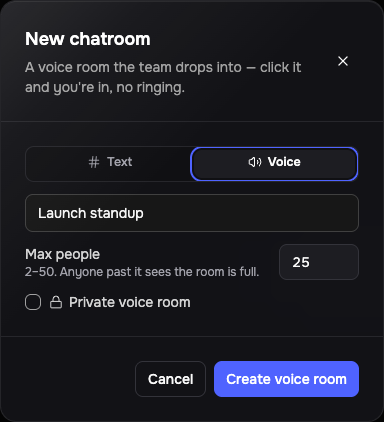
Voice rooms you just drop into
Make a voice room in a project's chat and your team can hop in and out all day, with no ringing and a size limit you choose.
Projects → open a project → ChatChoose the + above the chat rooms, pick New chatroom, then choose Voice.
02Workspace
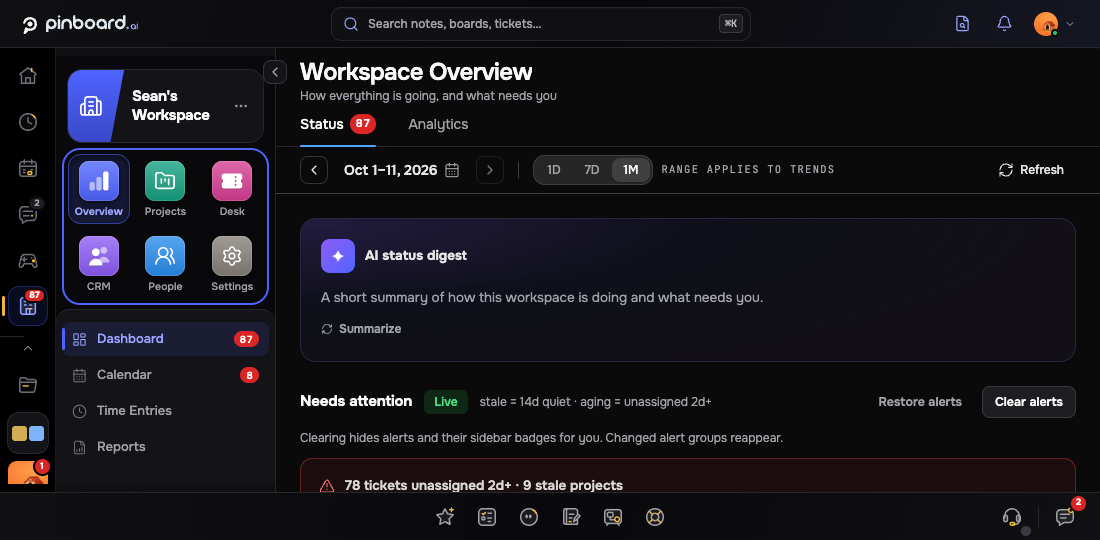
One sidebar for your whole workspace
The workspace sidebar now works like a project's, with apps for Overview, Projects, Desk, CRM, People and Settings and their pages underneath.
Workspaces → open a workspacePick an app at the top of the sidebar to see its pages.
03People
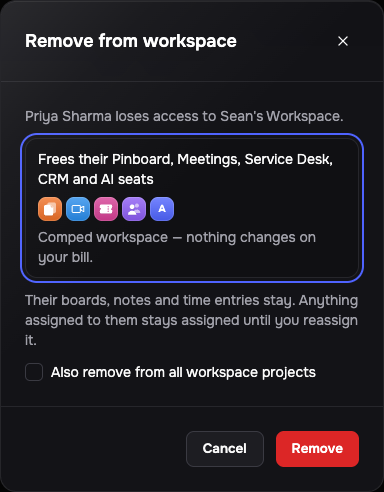
Know what removing someone does
Before you remove someone from a workspace, you see which seats it frees and what it does to your bill.
Workspaces → open a workspace → PeopleChoose the ⋯ beside a person, then Remove from workspace.
Every change
Billing
3- ImprovedService Desk is now $29 per agent and sits on top of a Pinboard seat, the same way Meetings does.
- ImprovedAll apps is now $49 for Pinboard, Service Desk and CRM together, with Meetings still included.
- ImprovedApps & Billing, invites, new projects and sign-up add the Pinboard seat when you pick Service Desk, and taking away someone's Pinboard seat takes their Service Desk seat with it.
Voice rooms
10- NewCreate a voice room from the + in a project's chat: click it and you're in, with no ringing, and your teammates see who's inside right in the sidebar.
- NewVoice rooms can be private, and each one has a size limit you choose, from 2 to 50 people.
- NewIf you're left alone in a voice room, you're taken out after 5 minutes so you don't stay on by accident.
- NewA voice room's chat quietly notes who joined and left, without counting as unread.
- NewWhen a voice room is full, choose Notify me and you'll get a heads-up as soon as a seat frees up.
- NewModerators can move someone to another voice room, and room managers can choose whether everyone or only moderators can share their screen.
- NewRemoving someone from a private voice room takes them out of it right away.
- ImprovedIf you're presenting and click another voice room, you're asked before your share stops.
- ImprovedVoice rooms remember whether you like to come in with your mic on or off.
- ImprovedCalls with lots of people show nine at a time, with whoever is speaking up front.
Chat
5- NewMark every chat read at once with the double check mark on the chat page and in the chat window at the bottom of the screen.
- NewCall someone straight from the small chat window at the bottom of the screen.
- ImprovedCalls start with one phone button, and you can turn your camera on once you're in.
- ImprovedYour own messages now sit on the right in blue on the chat page, the same as in the small chat window.
- ImprovedThe chat list shows your chats and who's around right now; search to find anyone else.
Workspace
4- ImprovedThe workspace sidebar has app icons for Overview, Projects, Desk, CRM, People and Settings, each with its own pages underneath, like a project's sidebar.
- ImprovedOverview holds the dashboard, Calendar, Time Entries and Reports, the same as in a project.
- NewThe Workspace icon on the far left shows how many alerts are waiting on your workspace Overview.
- FixedLong workspace names no longer get cut off at the top of the sidebar.
People
5- ImprovedPeople opens on your workspace's members; pick Guests, Invited or Everyone to see the rest.
- ImprovedEach person's projects and apps show as icons, with the name when you point at one.
- ImprovedThe page scrolls as one, and the column headings stay in view.
- ImprovedCost always shows each person's seat price, even in a comped workspace.
- NewBefore you remove someone, you see which seats it frees, how much your bill drops, and that the rest of the billing cycle comes back as a credit.
CRM
2- NewAccounts, Contacts and Leads now work across every project in a workspace, each with a Project column, just like deals and the forecast.
- ImprovedCRM sections live in the sidebar instead of tabs across the top, in both a workspace and a project, and each one appears only if you can open it.
Projects
2- ImprovedProjects show their picture next to their name across the app, or their short code on their color if they don't have one.
- ImprovedProject lists in menus show each project's picture and are wider and easier to read, on a phone too.