

13 changes
View-only roles stay view-only, AI records go when they should, and Pinboard fits your phone
People with a view-only role, and guests, can no longer change or delete meetings and recordings, or make changes through an API token. Copies of AI chats you report are now removed on the same schedule as the rest of your AI history. On a phone, content lists, notes and boards now fit the screen.
- 5 improved
- 8 fixed
On this page6 sections
Highlights
01AI assistant
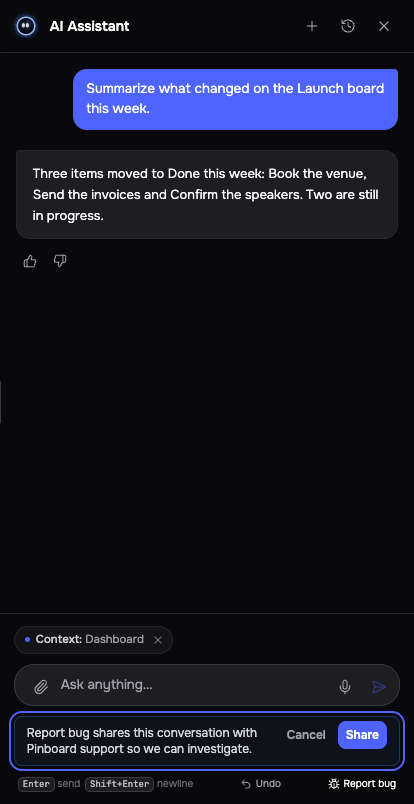
Report bug asks before it shares
When you report a problem with an answer, the assistant now says what will be shared, and only sends the chat to Pinboard support when you choose Share.
AI assistant → open a chatSelect Report bug under the message box, then Share or Cancel.
Every change
Meetings
2What to expect
Viewers and guests can still read meetings, notes and transcripts, but can't start a recording. Whoever made a meeting or a recording can still manage it. Anyone else needs a role that can edit meetings to rename, delete or move a meeting, or to change or delete someone else's recording.
- FixedPeople with a view-only role, and guests, can no longer rename, delete or move a meeting, or overwrite its notes.
- FixedOnly people who can edit meetings can start a recording, and only the person who made a recording, or someone who can edit meetings, can change or delete it.
API tokens
1What to expect
A token can do only what your role in the project allows. If your role there is view-only, the token can read but not change anything, even a Full access token.
- FixedAn API token now follows your project role everywhere, so a view-only role can't make changes through a token.
Templates
2What to expect
Anyone who can edit a project can still save docs and canvases as templates for it. Viewers and guests can still save personal templates and use any template they can see.
- FixedSaving a doc or canvas as a project template now needs a role that can edit that project.
- FixedPinboard's own templates open again from the public gallery.
AI assistant
3What to expect
Report bug now asks before it shares a chat. The copy you share, and the before-and-after record the assistant keeps so you can undo its changes, are cleared after 90 days or as soon as you delete the chat or the project. Changes older than 90 days can no longer be undone, and a background run's history keeps listing older changes without their details.
- ImprovedReport bug now says what it shares, and only shares when you confirm.
- FixedShared bug-report copies of a chat are removed when you delete the chat, and their content is cleared after 90 days.
- ImprovedThe canvas assistant can draw swimlane diagrams, and draws diagrams in plain colors unless you ask for color.
Phones
5What to expect
On a phone, docs, notes, wiki pages, sheets, boards, canvases and reports open for reading, and a note at the top says so. To edit them, use a tablet or computer. This applies with the phone upright or sideways.
- ImprovedContent lists, recent items and the search bar fit a phone screen, and recent items scroll sideways.
- ImprovedBoards show as an easy-to-scan list on a phone, with search and paging for large boards.
- ImprovedContent opens read-only on a phone, so a stray tap can't change it.
- FixedLong titles no longer push the note header off the screen, and the notes menu closes when you open a note.
- FixedA sheet that can't be read shows a message instead of a blank page.