

65 changes
A rebuilt AI assistant with an expert for every app, sketches in the chat, and a roomier canvas
The assistant now hands your request to the expert for the app you're in, can sketch ideas right in the chat, and takes pictures you drop or paste. Canvases get a page picker, a minimap you can hide, and safer saving.
- 21 new
- 17 improved
- 27 fixed
On this page14 sections
Highlights
01AI assistant
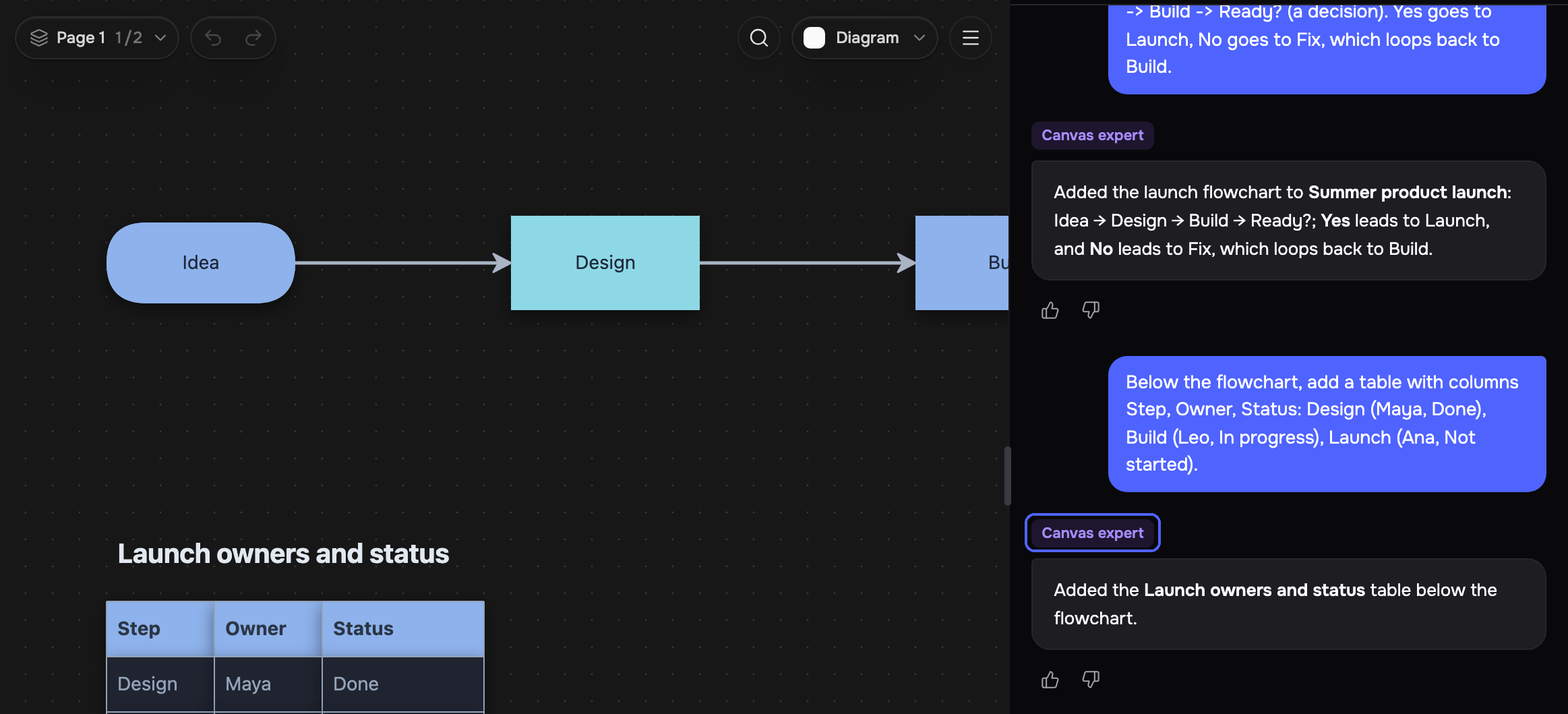
An expert for every app
Ask on a canvas, sheet, board, ticket, deal, doc, wiki page or timesheet and that app's expert answers, working directly on what you have open.
Any canvas, sheet, board or ticket → AI assistantOpen the assistant from the bottom bar; the badge above each answer shows which expert gave it.
02AI assistant
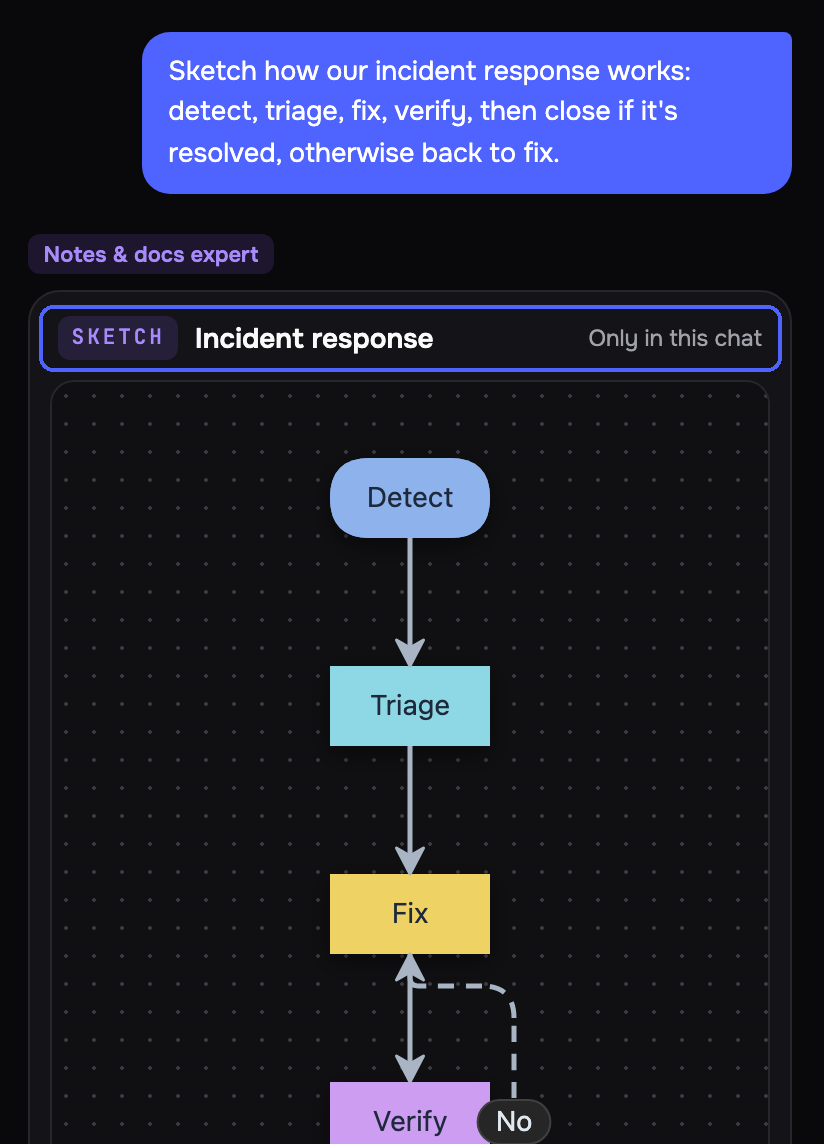
Sketch it in the chat
Ask the assistant to sketch a process and it draws a diagram right in the conversation, which you can open larger or save as a canvas.
AI assistant → ask it to sketch somethingOpen the sketch to pinch, scroll and drag around it, or choose Save as canvas to keep it.
03Canvas
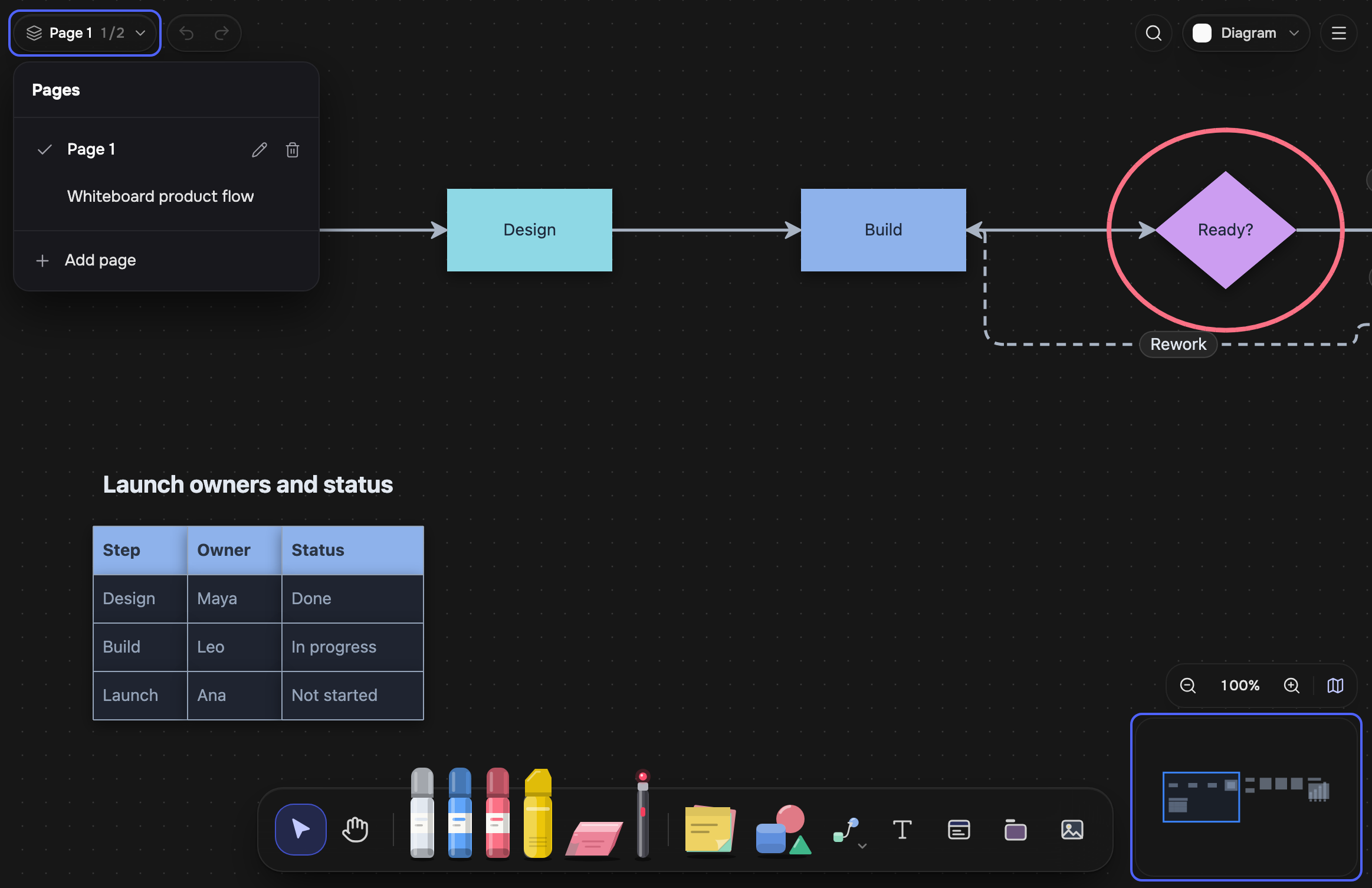
Pages and a minimap, out of your way
Switch, rename and add canvas pages from a picker in the top-left corner, and hide or show the minimap from the zoom controls.
Content → any canvasPick a page from the Page menu at the top left; the map button beside the zoom level shows or hides the minimap.
Every change
AI assistant
15- NewThe assistant has been rebuilt: it plans a request, works through it step by step, and shows you the plan as it goes.
- NewWhen a change needs your approval, the assistant pauses, and approving it picks up exactly where it stopped, reporting what really changed.
- NewAnswers can include tidy cards, tables and lists that appear as the answer is written.
- NewDrop files anywhere on the chat, or paste a screenshot, to attach them.
- NewThe assistant can sketch a diagram in the chat; open it larger to pinch, scroll and drag, or save it as a canvas.
- NewThe assistant can open a page for you when you ask it to take you somewhere.
- NewRate any answer with a thumbs up or down.
- ImprovedThe assistant now runs on a newer default model, with a reasoning level set for each kind of task.
- ImprovedThe context chip names the canvas, doc, sheet, board, ticket, record or wiki page you have open.
- ImprovedUndo reverts the whole request an approved change belongs to, and says what it undid.
- ImprovedPages an AI change touched refresh on their own.
- ImprovedLong conversations stay on track: older turns are summarized instead of being forgotten.
- FixedEach step and the final reply show once, never twice.
- FixedA reply cut off part-way no longer leaves the request stuck as "processing".
- FixedFiles you attach can only be files you uploaded yourself.
Expert agents
8- NewEach app has its own expert that knows it deeply and checks its own work before it answers.
- NewEvery answer shows which expert gave it.
- NewThe Canvas expert draws shapes, flows, tables, charts and freehand marks, and edits what's already there.
- NewThe Sheets expert writes formulas and child rows; the Boards expert changes structure, views, groups and automations.
- NewThe Service Desk expert triages tickets, adds internal notes and prepares replies for you to approve; the CRM expert works with accounts, deals and the pipeline.
- NewThe Notes and docs and Wiki experts edit documents block by block and organize your content and wiki tree; the Time expert handles entries and timesheets.
- ImprovedFiles you attach reach whichever expert takes on the work, and again after you approve a change.
- ImprovedAdmins see each expert as a row under its app on the AI agents page.
Canvas
13- NewPages live in a picker in the top-left corner, instead of a row of tabs under the board.
- NewHide or show the minimap from the zoom controls.
- NewThe toolbar is a pen ledge along the bottom, with a highlighter and an eraser.
- NewChoose a board look: Diagram, Whiteboard or Blackboard.
- NewWhen the assistant draws on the canvas you have open, the view brings its work into sight.
- ImprovedAsking the assistant to put something "below" or "to the right of" a shape puts it there, and it tells you where it landed.
- ImprovedUndo and redo sit in the top row, and the minimap moves aside for the toolbar.
- ImprovedSticky notes are gently tilted, the Blackboard has a chalk grain, and handwriting is kept in SVG exports.
- ImprovedLabels on hatched shapes are easier to read.
- FixedSaving a canvas merges into what's stored instead of replacing it.
- FixedA freshly saved sketch opens zoomed to fit.
- FixedA canvas no longer gets a second "Page 1" when the assistant writes to it.
- FixedA resized corner no longer flickers over the toolbar.
Project templates
2- NewSave a project as a template, including its folders, boards, docs, canvases and wiki.
- NewStart a new project from a template, or add a template's content to an existing project.
Sheets
5- ImprovedOlder status columns become select columns, keeping every value.
- ImprovedSelect values can be read and written by their names.
- FixedFormulas carry 15 significant digits, as a spreadsheet does.
- FixedCHILDREN() returns rows in the order the grid shows them, and formulas read a select cell as its label.
- FixedText left in a select cell shows as itself instead of disappearing.
Sidebar
2- ImprovedThe project banner shows the project's key, without a second duplicate code.
- FixedProject tiles on the left rail show their unread count again, and folder tiles no longer show a name.
Billing and seats
3- ImprovedPast-due read-only mode now covers Content and Sheets, and a blocked save says why instead of offering to retry.
- ImprovedProject guests can read Content without taking a seat.
- FixedA subscription whose first payment never went through, that stopped collecting, or that is paused no longer unlocks paid apps.
Sign-in
2- FixedSigning in is more reliable: your session is saved before the app continues, so you're no longer occasionally sent back to the sign-in page.
- FixedHitting a rate limit no longer signs you out or calls a note private.
Mobile
3- NewTell the assistant what to fix from your phone: dictate a message, or tap Fix this on a board or item to ask about what's on screen.
- ImprovedApproval buttons are full-width and easy to tap on small screens, and big batches lead with a one-line summary.
- FixediPhones no longer zoom the page when you type into a field.
CRM
5- FixedA space with CRM turned on but no pipeline gets the default pipeline instead of "No pipeline configured".
- FixedPipeline totals are shown per currency, and weighted totals fall back to the stage's default win rate.
- FixedOnly moving a deal to a won or lost stage closes or reopens it, and its status and column stay in step.
- FixedA deal with line items takes its amount from them.
- FixedTerritory map tiles no longer show a watermark.
Service Desk
2- FixedA ticket's impact, urgency and pending reason save when you change them.
- FixedWhen several SLA policies match a ticket, the most specific one applies.
Notes, wiki and sharing
4- FixedShared or Private on a project note keeps its creator and project admins, and sharing it works.
- FixedProject admins and editors can see and remove a project note's shares.
- FixedPrivate boards and note folders stay private everywhere, and locked wiki pages can't be restored over.
- FixedTrash no longer shows the names of private files.
Time
1- FixedThe duplicate-entry check compares calendar dates correctly.