

16 changes
A cleaner canvas and dates you can trust
Canvas gets a clearer toolbar and tidier shapes, date and duration edits reschedule the way you expect, and risky dependencies stand out.
- 2 new
- 8 improved
- 6 fixed
On this page5 sections
Highlights
01Boards
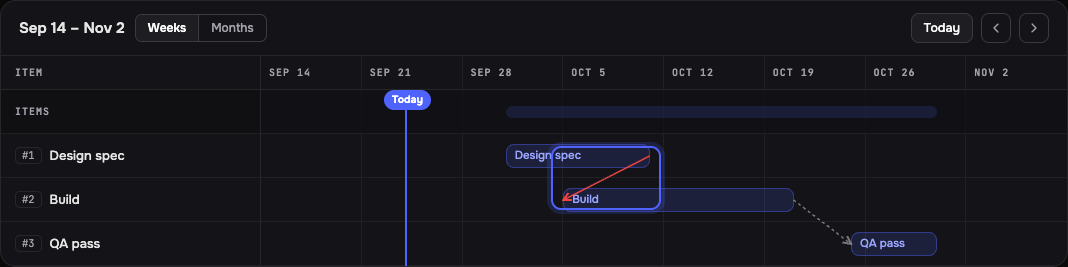
Spot dependencies that put a start date at risk
When one item is scheduled to finish on or after the day the item waiting on it starts, the link turns red so you can fix the plan before it slips.
Board → TimelineLook for solid red arrows between items; the Relationships column lists the same links in red, at the top.
02Canvas
A canvas toolbar you can read at a glance
Each tool now looks like what it makes, and the one you have picked is clearly highlighted.
Content → any canvas → toolbarPick a tool, or press its number key: 3 picks Sticky note.

Every change
Canvas
9What to expect
Existing canvases pick up the new look automatically; nothing on them moves. Shortcuts now work right after you click a toolbar button.
- ImprovedThe toolbar shows each tool as the thing it makes (a sticky, a shape, a card, a section), and the armed tool is easy to spot.
- ImprovedThe shapes and icons drawer sits below the toolbar, with search and tabs, and never covers it.
- ImprovedSticky notes are a clean flat sheet with a folded corner, and they read clearly in dark mode.
- ImprovedThe style panel and the menu above a selection match the new toolbar.
- ImprovedSections have a colored frame with the name on a pill, filled shapes get a soft shadow, and the board has a dot grid.
- ImprovedArrows are bolder with a solid arrowhead, and connectors that share a path are spread apart so each one can be followed.
- FixedNumber keys switch tools even when the canvas itself isn't focused.
- FixedDelete, undo, duplicate and group keep working right after you pick a tool from the toolbar.
- FixedClicking Sticky while the shapes drawer is open now picks Sticky and closes the drawer.
Boards
4What to expect
On boards with one Start date, one End date and one Duration column, a blank date fills in from the other two; dates you already set are never changed. To have dates update whenever one changes, set the Duration column's Date calculation to Calculate dates, or to Store duration only to turn it off. A dependency counts as at risk when the earlier item finishes on or after the next item's start, or, on boards whose Status column has an option in the Done group, is still open once that start date arrives.
- NewDependencies that are at risk show in red in the Relationships column, sorted first, and as solid red arrows on the timeline.
- ImprovedA blank start date, end date or duration fills in from the other two, and whole numbers in a duration mean working days.
- FixedTyping a date no longer saves half-finished dates as you type or warns that your own edit conflicts.
- FixedTimeline arrowheads now match the color of their dependency line.
Sheets
1What to expect
Only sheets that schedule work by start date, end date and duration are affected; other sheets behave as before.
- FixedA sheet's Duration column stays linked to its schedule when you add, rename or change other columns.
Connected assistants
2What to expect
Deleting a page still needs a role that can delete wiki pages; connecting an assistant never grants more than you have.
- NewAn assistant connected to Pinboard can delete a wiki page, within your permissions.
- ImprovedAsking an assistant to move an item to another board now guides it to the transfer that keeps the item's history.