

39 changes
Formulas in sheets, AI agents on boards, a public help center, and an importer for the work you already have
Sheets compute: type a formula into any cell or column, read values across sheets, and build one report over many sheets. A board item can be handed to an AI agent that works it and reports back. A project's knowledge base can be published as a public help center. Issues from an existing tracker land on a board of their own, and the service desk gains saved replies, satisfaction surveys and queues that hand out their own tickets.
- 24 new
- 8 improved
- 7 fixed
On this page10 sections
Highlights
01Boards and AI
Give your board an extra pair of hands
Hand an item to an AI agent, watch its progress, and open the record of what it did.
Board → Open an itemChoose Let AI work on this below the title.

02Sheets
Let your sheets do the math
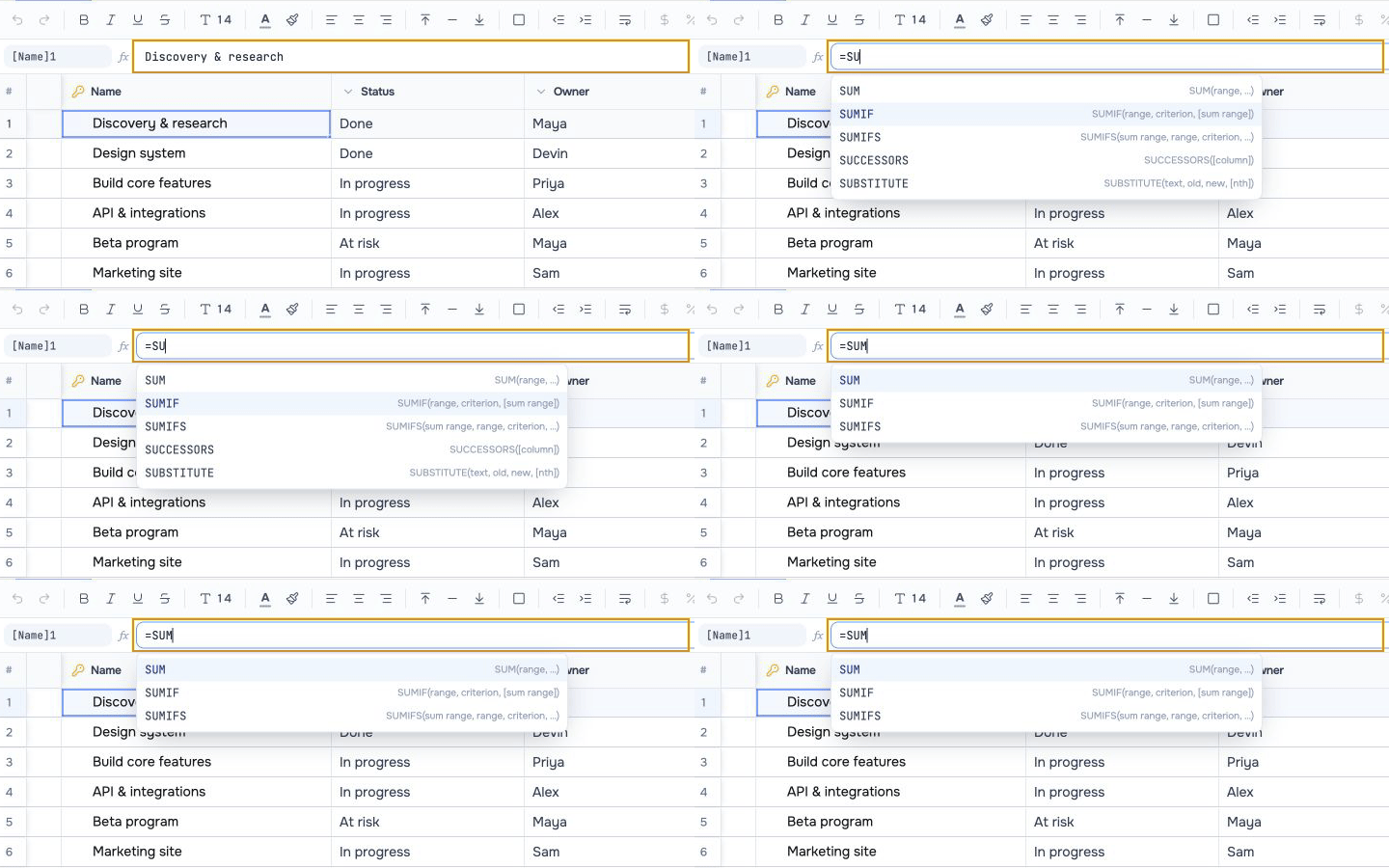
Write formulas with live suggestions, right above your sheet.
Sheet → Select a cellType = in the formula bar above the grid.
03Knowledge base
Your knowledge, ready for everyone
Publish selected articles as a public help center. Keep everything else private.
Project → Knowledge settings → Help centerSet a Public address, then Save.


Every change
Sheets
10- NewType a formula into any cell, or make a whole column a formula, and it computes as its inputs change — including values on other sheets.
- NewA sheet can carry summary fields beside its grid, and a formula reads one as [Field]#.
- NewSheet Reports show one grid over many sheets, live, and you edit the rows right there.
- NewA formula bar, autocomplete from the first keystroke, and click-or-drag over cells to reference them while you type.
- NewDrag the fill handle to fill a rectangle, and give a number column a format.
- NewSheets export and import CSV, and a project can publish a public status page.
- ImprovedRenaming a column or a sheet rewrites every formula that named it.
- ImprovedThe plain column is Text/Number; Rich text is the other one, and Formula is in the column type pickers.
- FixedAggregates skip text, a blank compares equal to zero, and a formula that recomputes counts as a change.
- FixedColumn menus stop at the bottom of the window, and the column editor scrolls on a short screen.
Boards and AI
7- NewAn AI column fills itself from the item, on request or whenever its inputs change.
- NewHand an item to an AI agent beside its assignee, watch it work, and read what it did; every run is a record you can open later.
- NewAn automation rule can hand an item to an agent and wait for it.
- NewAn agent can connect to tool servers you approve and use their tools on a run, signing in where the server asks.
- NewA workspace can bring its own model keys, choose its models, and pin a key to one agent.
- ImprovedThe field type picker is grouped, tinted by role, and reads in full; the field lock follows the category, so ticket columns are removable and come back.
- FixedA timestamp column is wide enough for the whole stamp, and the remove-column confirm tells the truth for a ticket column.
Knowledge base
4- NewA project's knowledge base can be published as a public help center at its own address, showing only the articles you mark public.
- NewA site-wide knowledge base, the twin of the site-wide ticket desk, and a Help button in the toolbar.
- ImprovedChat bots link the articles they answered from, article covers show, and republishing keeps a flow off.
- FixedA visitor without an account is no longer bounced from a help center to the login page.
Service desk
6- NewSaved replies, so an agent stops retyping the same answer.
- NewAsk the requester how it went when a ticket closes, and read the answers in one report.
- NewA queue can hand its own tickets out to the people in it.
- NewThe desk shows who else is on a ticket, carries a Created column, and opens newest-submitted first.
- ImprovedThe desk sorts by Last updated, the drawer sorts again, and the row number is a column.
- FixedThe Save marker lights only for real changes, beside the tab it saves onto.
Integrations
4- NewConnect an issue tracker or wiki you already use, with a token or a sign-in, and its issues arrive on a board of their own with their comments.
- NewA workspace importer walks your existing projects, previews what will land, lets an admin tick what to tidy, and can be undone from the connection.
- NewLink an imported contact to the member they are, and everything they own follows.
- NewA published Zapier app, so Pinboard can sit inside the automations you already run.
Billing and invitations
4- NewWhoever can invite can seat the person they invite.
- ImprovedThere are no more free trials, and a workspace's status follows its subscription.
- FixedThe seat quote reads a comp as a comp and takes the coupon off the price; an app with no published price stays out of the basket, and a failed checkout stays on the page.
- FixedA guest's missing seat and the admin two-factor policy are both visible where an admin looks.
Getting started
1- NewA five-stop quick tour of the shell, once after signup and any time on request from a project URL.
Voice and meetings
2- ImprovedThe Voice studio has themes and a recording review, and a recording can be trimmed with a scrubber.
- ImprovedAgenda notes share the notes editor.
Arcade
1- NewA searchable game store with cards and details, daily Circuit and Vault puzzles with workspace leaderboards, and private game invites from chat.