

12 changes
Bring linked work into each board row
Calculate results from linked boards, preview each row’s rules, and move work between boards with more confidence.
- 3 new
- 4 improved
- 5 fixed
On this page5 sections
Highlights
01Boards
Preview results from linked work
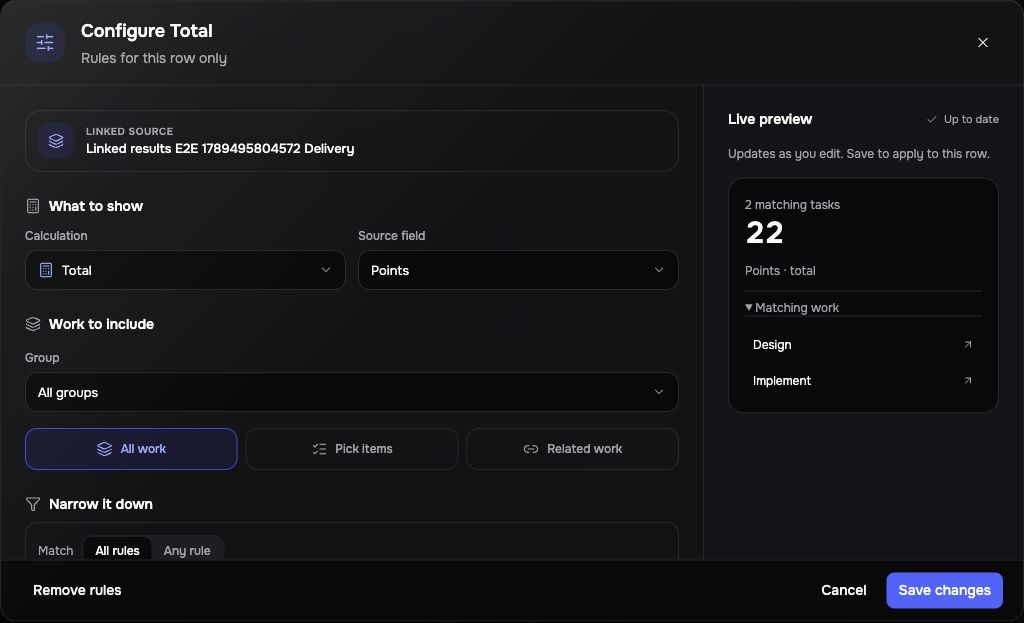
Give each row its own calculation and see matching work update as you edit the rules.
Project → Content → Board → Linked resultChoose the configure control beside a linked result to edit this row’s rules and preview its calculation.
Every change
Boards
6What to expect
Link a source board, add a linked-result column, and configure each row. Results respect your access to the source. Preview edits before saving; copying a row keeps an independent copy of its rules.
- NewCalculate counts, totals, and other results from a linked board with separate rules for each row.
- NewSave reusable recipes, filter matching work, and preview the result while editing.
- NewMove work between boards and connect related items with relationships.
- ImprovedResult cells show what their numbers mean, including currency and source fields.
- FixedLinked-board editors open reliably, refresh changed fields, and keep calculations when rows are duplicated.
- ImprovedLarge linked boards calculate results more reliably, and viewer presence sits beside the board description.
Billing
2What to expect
New Service Desk purchases use $20 per seat monthly or $200 annually. Existing subscriptions keep their current prices; app availability depends on your workspace plan.
- FixedCheckout uses the configured monthly or annual app price and avoids adding a separate Content charge to the bundle.
- FixedSubscription updates recognize billing periods from the payment provider and apply payment grace periods consistently.
Account and content protection
2What to expect
Your existing project and workspace permissions continue to determine which content you can open, share, search, and upload.
- ImprovedStrengthened sign-in, verification, shared-content, and file-access checks.
- FixedBackground previews and indexing recheck their source files before processing.
Product pages and AI integrations
2What to expect
Product and solution pages show previews in their detail sections. Developer documentation describes the currently supported connection and authentication options.
- FixedProduct and solution detail pages display their intended previews.
- ImprovedUpdated AI connection documentation and added tools for linked-board results and task transfers.